
Network Management
How to set a specific URL to be used in Alert Macros
This article outlines how to configure a specific URL to be used in Alert Macros.
First published date
6/4/2020 7:42 AM
Last published date
6/4/2020 7:42 AM
Overview
In some instances it may be required to set a different domain in the Alert Macros. For example, users accessing from outside the network may need to use a specific URL.
Product section
Orion Platform
Cause
How to
Resolution
If you need to set a specific alert for all Alert Macros to use, you can do the following:
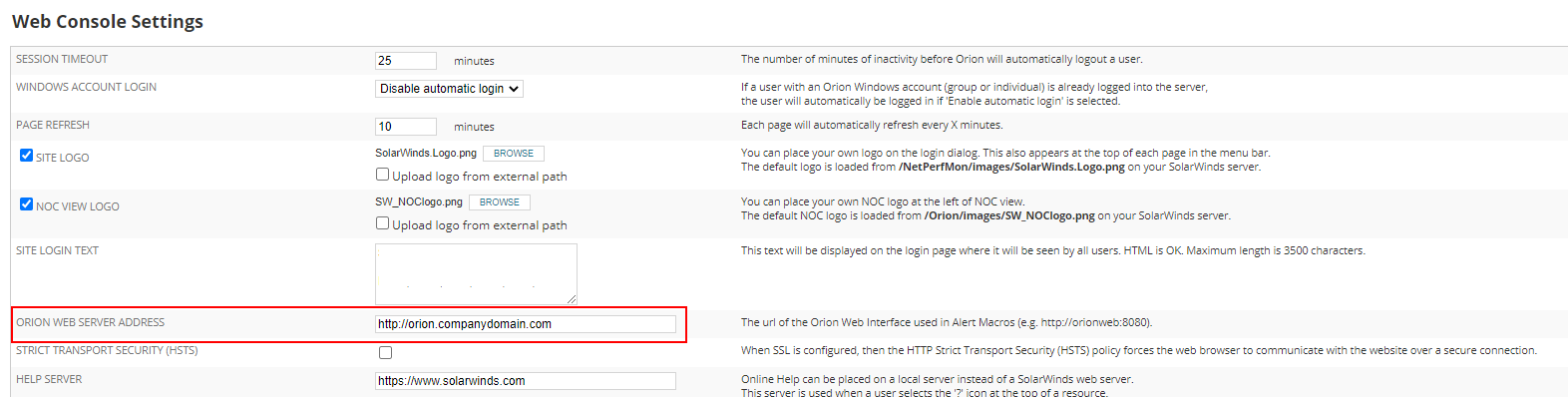
In this instance all of the links created by Alert Macros will begin with http://orion.companydomain.com/
- From the Web Console navigate to Settings -> All Settings -> Web Console Settings
- Update the ORION WEB SERVER ADDRESS setting with the required URL
- Click Submit
In this instance all of the links created by Alert Macros will begin with http://orion.companydomain.com/