
Security Compliance
How to see and change scheduled jobs in ARM
ARM has the function to schedule in a form of re-occurring jobs or jobs that will be started on an exact date. For example, disable user account on 12.12.2020
First published date
6/19/2020 2:14 PM
Last published date
10/28/2020 3:00 PM
Overview
From time to time there is a need to change these jobs or to delete them. This article will help you to find scheduled tasks and how to edit them.
Product section
Access Rights Manager
Cause
Imagine the scenario where you have scheduled jobs to disable user and remove him from all groups because his contract expires in December for example. But during the weeks, months there was a change and this user is now permanent employee and his account shouldn't be disabled and he should keep all of his groups memberships.
Resolution
The ARM main application lists all scheduled tasks. Perform the following steps to change the schedule:
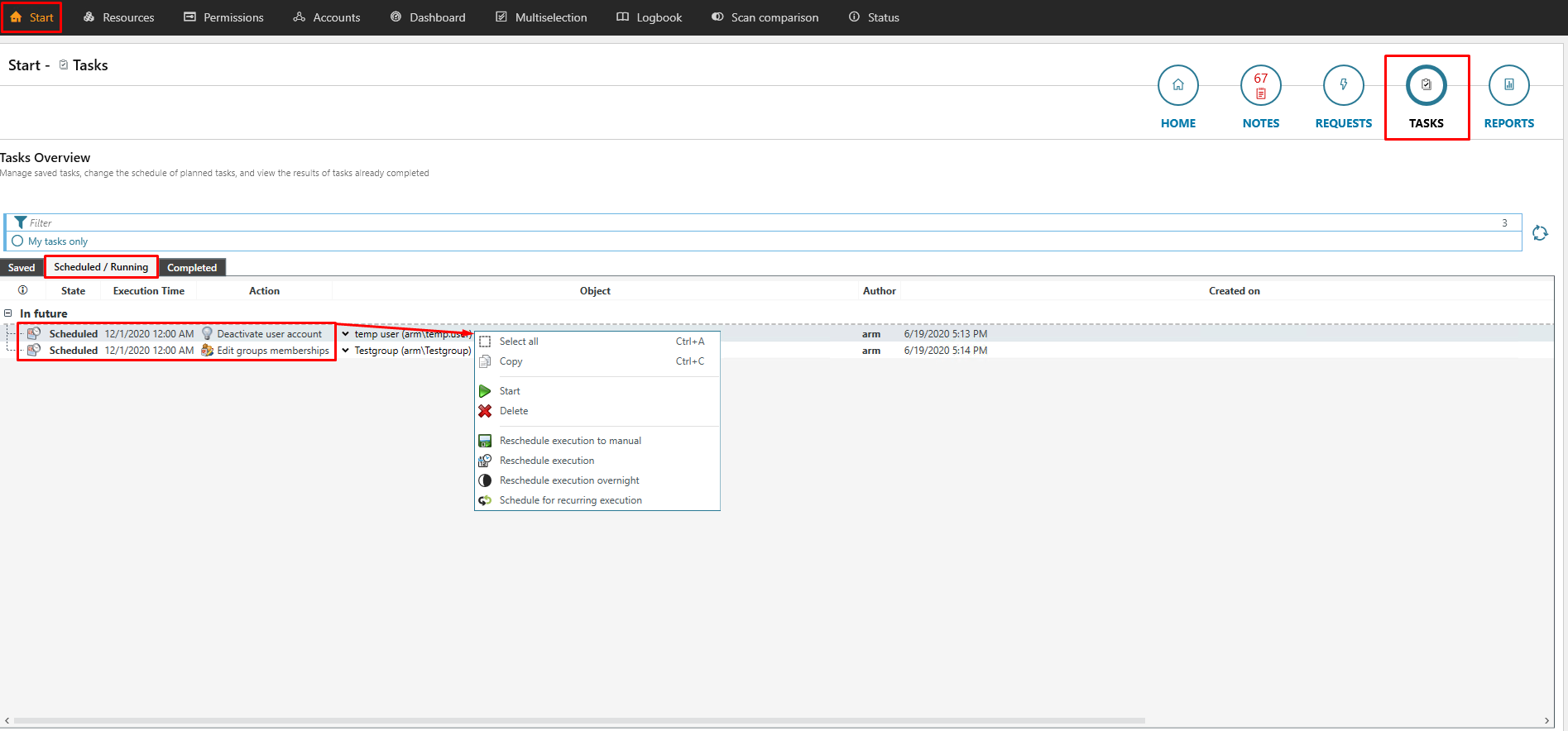
- Log in to the ARM main application
- Select Start
- Click Tasks
- Right-click the desired task from the list
- Select an option from the context menu