
Tools
How to reset the 2FA/MFA of a technician account in Dameware Remote Everywhere (DRE)
Step-by-step guide on resetting the technician 2FA.
First published date
2/2/2024 1:04 AM
Last published date
8/8/2025 3:46 PM
Overview
This applies to the following:
Notes: Only the Master/Primary account can reset the 2FA.
- The device where the authenticator device has lost
- The technician changed the mobile device, and it has no recovery code
- The technician cannot remember the authenticator app used or configured during the setup period
Notes: Only the Master/Primary account can reset the 2FA.
Product section
Dameware Remote Everywhere
Resolution
1. Log in to the DRE web admin area.
2. Go to Management, and then select Technicians.
3. Select the technician profile that requires a reset.
4. Click More and then choose Reset Two-Factor Authentication.
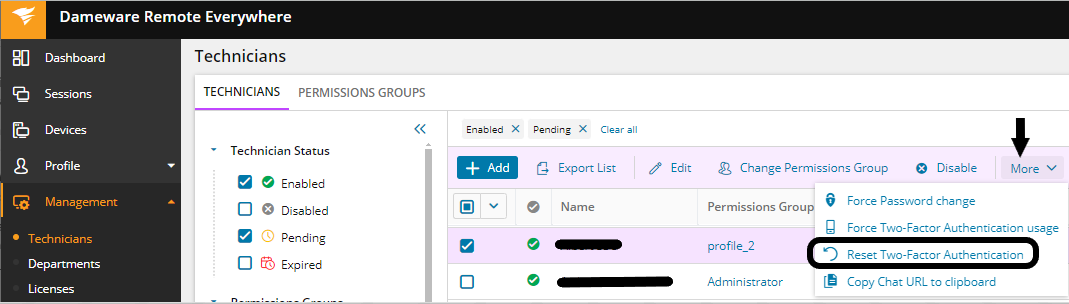
When the technician tries to log in again, they would need to reconfigure the 2FA and ensure a recovery code is backed up so it will be easy to set it up again.
2. Go to Management, and then select Technicians.
3. Select the technician profile that requires a reset.
4. Click More and then choose Reset Two-Factor Authentication.
When the technician tries to log in again, they would need to reconfigure the 2FA and ensure a recovery code is backed up so it will be easy to set it up again.