
Network Management
How to monitor or alert on Switch Stack Member Count
A basic alerting for switch stack member count (event-based).
First published date
9/23/2019 3:34 PM
Last published date
4/28/2020 3:29 PM
Overview
A sample trigger condition to monitor the count of Switch Stack member when it was removed or lost and if there's a member added.
Product section
Network Performance Monitor
Resolution
1. Create a New Alert. From the web console, go to Settings > All Settings > Manage Alerts > Click 'Add New Alert'.
2. Fill out the necessary or required fields.
3. On the Trigger Condition, Choose Switch Stack on I want to alert on
4. Copy the condition below:
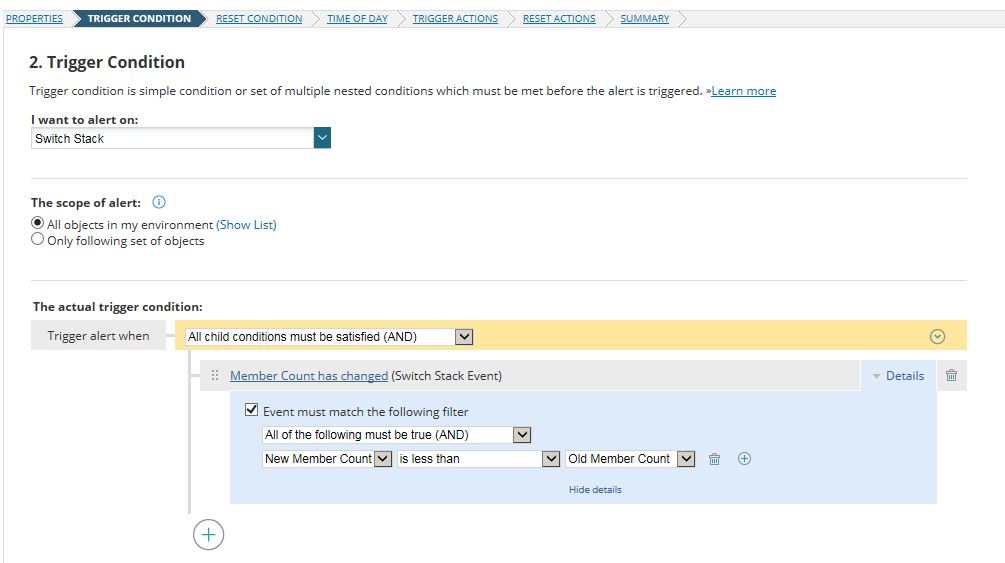
5. Click Next and fill out the other necessary fields to finish creating the alert.
2. Fill out the necessary or required fields.
3. On the Trigger Condition, Choose Switch Stack on I want to alert on
4. Copy the condition below:
5. Click Next and fill out the other necessary fields to finish creating the alert.