
Applications Systems
How to log into the WPM Recorder
This explains the process for logging into the WPM recorder
First published date
8/23/2019 3:04 PM
Last published date
10/2/2019 2:02 PM
Overview
This is a complete walk-through of logging into the WPM recorder (prior to WPM 3.0) to get started with building recordings.
Product section
Web Performance Monitor
Resolution
First, download the WPM recorder to your workstation or Windows server. Ensure that you're not downloading to a workstation that is running Windows 10 operating system on WPM versions prior to WPM 3.0. This is an unsupported operating system for the Recorder as well as the Player.
After installing the Recorder,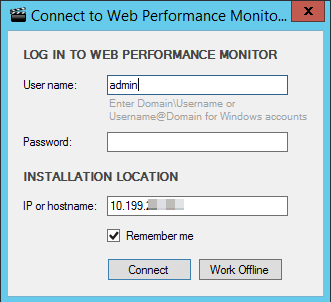
After installing the Recorder,
- Go to the Start menu > SolarWinds Orion > WPM Recorder
- Enter information to connect.
- Click connect.
- User entered must have WPM administrator role.
- User cannot be added via a Windows AD Group - must be added into Orion via individual user.
- Server must be the main polling engine where the website is hosted or an Additional web server.
- Once connected you may start building web recordings.