
Applications Systems
How to disable alerts for Virtual Clusters from being triggered both on Nutanix and VMware clusters
When an alert has a trigger condition for Virtualization Cluster objects, or for child entities (hosts, VMs, datastores, virtual disks, etc.) that exist as part of both a VMware cluster and a Nutanix cluster, this alert can be triggered twice, once for VMware and once for Nutanix.
First published date
11/5/2019 6:13 AM
Last published date
4/8/2025 11:34 PM
Overview
When an alert has a trigger condition for Virtualization Cluster objects, or for child entities (hosts, VMs, datastores, virtual disks, etc.) that exist as part of both a VMware cluster and a Nutanix cluster, this alert can be triggered twice, once for VMware and once for Nutanix.
For example, if you have an alert on a Virtualization Cluster that triggers when one of the cluster’s hosts is in a critical state, the alert will trigger twice (once for VMware, once for Nutanix) if the host is part of both a VMware and a Nutanix cluster.
For example, if you have an alert on a Virtualization Cluster that triggers when one of the cluster’s hosts is in a critical state, the alert will trigger twice (once for VMware, once for Nutanix) if the host is part of both a VMware and a Nutanix cluster.
Product section
Virtualization Manager
Cause
This is a normal action for an alert that’s configured with a general trigger for a Virtualization Cluster object or for a virtual object (host, virtual machine, datastore, virtual disk, etc.) that is associated with both VMware clusters and Nutanix clusters.
Resolution
If the duplicated alerts are not desired, you can use the following workaround to prevent duplicate alerts, alerting only for VMware or Nutanix.
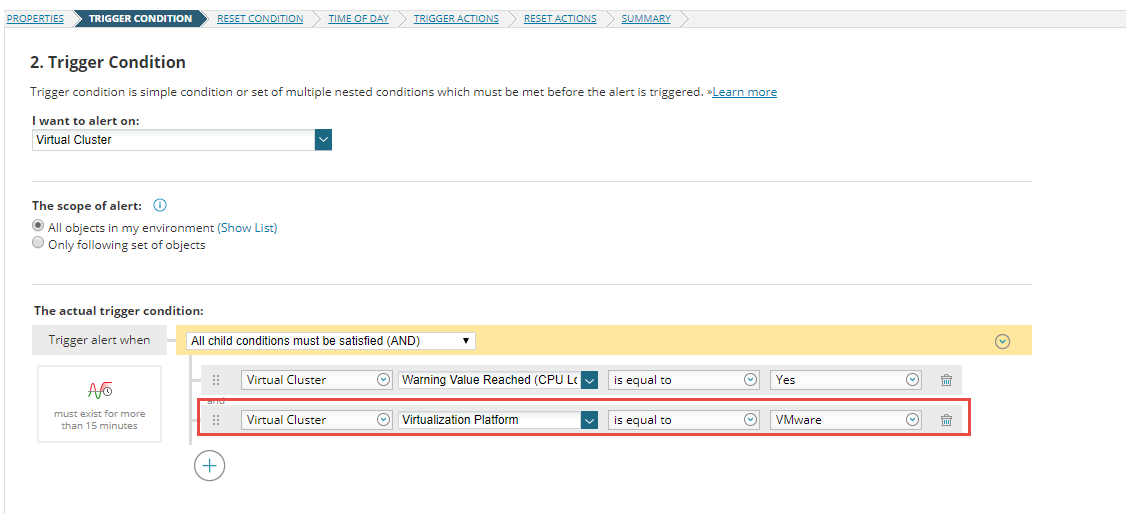
Note: The Virtualization Platform option also exists for Virtual Host and Virtual Machine object types. However, the Virtual Cluster object type must be selected for the Virtualization Platform condition.
Tip: If you are using an out-of-the-box alert that has duplicated behavior, you can disable the out-of-the-box alert, make a copy of the alert, and add the trigger condition as described above.
- Add an additional trigger condition to the alert for the property "Virtualization Platform" of the “Virtual Cluster” object,
- Set it to the type of cluster you want to trigger the alert on, “VMware” or “Nutanix”, depending on your desired behavior.
Note: The Virtualization Platform option also exists for Virtual Host and Virtual Machine object types. However, the Virtual Cluster object type must be selected for the Virtualization Platform condition.
Tip: If you are using an out-of-the-box alert that has duplicated behavior, you can disable the out-of-the-box alert, make a copy of the alert, and add the trigger condition as described above.