
Network Management
How to create an alert in Orion when a Orion user account is modified or deleted
This article provides steps on how to create an alert in Orion Core products when a Orion user account is modified or deleted.
First published date
8/1/2021 3:13 PM
Last published date
8/1/2021 3:13 PM
Overview
If you want to find out and get alerted when a Orion user account is modified or deleted, then you are at the right place. Continue to resolution section for steps.
Product section
Orion Platform
Cause
NA
Resolution
1. Login go Orion web console with admin account.
2. Go to Alerts > Manage Alerts
3. Create New Alert with a trigger condition similar to below:
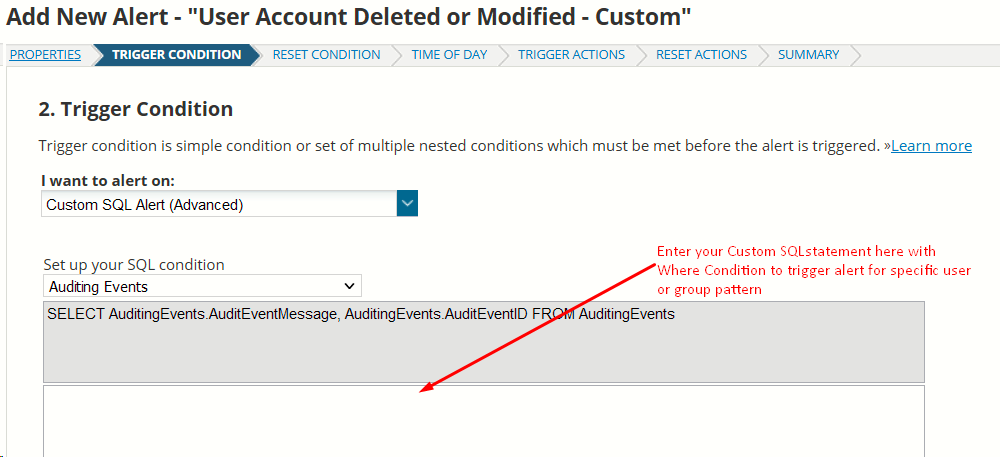
4. Leave the rest of the conditions default or modify depending on your needs.
5. Add a trigger action > Send email and fill in the necessary details and click submit to save the alert.
6. To test the alert modify any Orion user accounts that match the Trigger condition username string pattern.
This was tested in 2020.2.5 and confirmed worked as of that version.
2. Go to Alerts > Manage Alerts
3. Create New Alert with a trigger condition similar to below:
4. Leave the rest of the conditions default or modify depending on your needs.
5. Add a trigger action > Send email and fill in the necessary details and click submit to save the alert.
6. To test the alert modify any Orion user accounts that match the Trigger condition username string pattern.
This was tested in 2020.2.5 and confirmed worked as of that version.