
Network Management
How to change CBQos Polling interval
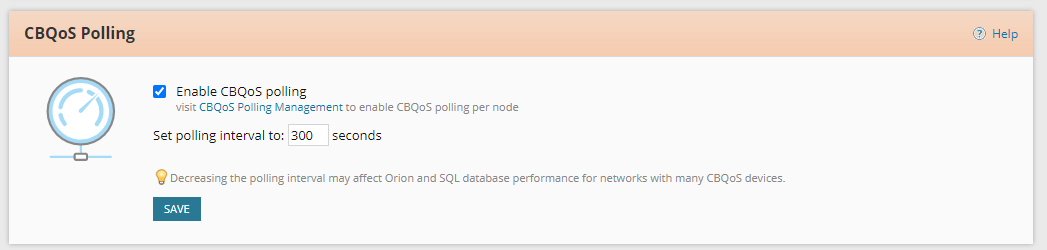
This article shows where you can update the CBQoS Polling interval
First published date
4/16/2021 2:39 AM
Last published date
4/16/2021 2:39 AM
Overview
SolarWinds NTA offers flow traffic statistics that can help in determining what CBQoS classes and policies to create and apply. SolarWinds NTA also includes configurable alerts to help you verify the expected effects of the policy maps you apply to interfaces on your relevant Cisco devices. SolarWinds NTA provides information for tuning the CBQoS implementation.
Product section
Netflow Traffic Analyzer
Cause
N/A
Resolution
From the web console:
-Go to Settings > All Settings
-Click on NTA Settings
-Under "CBQoS Polling"
From the database:
-On your Solarwinds server> Go to Start > Solarwinds Orion > Database Manager
-Click Add Orion Server
-Expand your Database
-Go to "Settings" table and double click
-Click execute query
-Look for "CBQoS_Polling_Interval"

-Go to Settings > All Settings
-Click on NTA Settings
-Under "CBQoS Polling"
From the database:
-On your Solarwinds server> Go to Start > Solarwinds Orion > Database Manager
-Click Add Orion Server
-Expand your Database
-Go to "Settings" table and double click
-Click execute query
-Look for "CBQoS_Polling_Interval"