
Security Compliance
How to add Country/Region dropdown into Create User template in Access Rights Manager (ARM)
Example to use in ARM template to create a dropdown for Country/Region selection
First published date
7/8/2021 1:27 PM
Last published date
7/8/2021 1:27 PM
Overview
While automating the creation of a user account you may need to simplify the process of adding Country/Region. The below article provides information on how to do it using a simple dropdown.
The solution is based on the custom templates functionality provided by Access Rights Manager (ARM). Please make sure to familiarize yourself with this feature by reviewing the below documentation:
Customize ARM templates
The solution is based on the custom templates functionality provided by Access Rights Manager (ARM). Please make sure to familiarize yourself with this feature by reviewing the below documentation:
Customize ARM templates
Product section
Access Rights Manager
Resolution
In your custom template (LdapAttributes section) use the below snippet:
For additional values please check below:
https://www.iso.org/iso-3166-country-codes.html
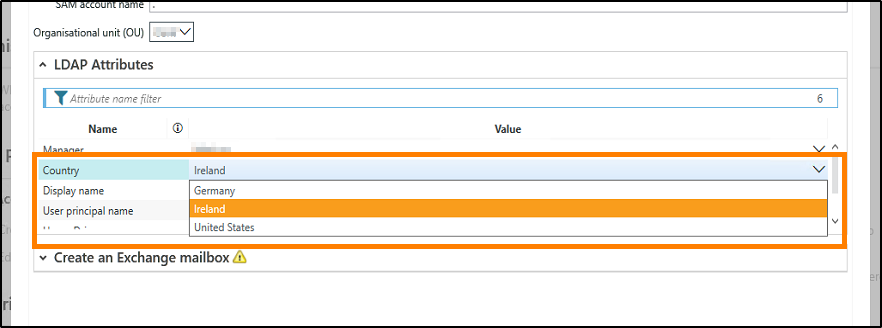
Once the template is loaded into ARM you will have a dropdown with chosen values similar to below:
    "LdapAttributes": [
(...)
        {
            "Name": "countryCode",
            "Definition": {
                "Type": "DropDownList",
                "Items": [
                    {"DisplayValue": "Germany",        "Value": "276"},
                    {"DisplayValue": "Ireland",        "Value": "372"},
                    {"DisplayValue": "United States",    "Value": "840"}
                ],
                "DefaultValue": "372",
                "Label": "Country"
            }
        },
(...)
    ],
For additional values please check below:
https://www.iso.org/iso-3166-country-codes.html
Once the template is loaded into ARM you will have a dropdown with chosen values similar to below: