
Tools
How to Update Serv-U Users Home Directory in bulk
This article described how to change the Home directory of the user using bulk actions
First published date
9/18/2019 3:41 PM
Last published date
5/11/2022 6:04 PM
Overview
Serv-U has an option to export and import the Users List and includes all collection settings into CSV File. If home directory needs to be changed using bulk actions, the exported file can browse using Microsoft Excel and do the necessary changes.
Product section
Serv-U Managed File Transfer & Serv-U FTP Server
Resolution
Pre-Implementation Steps:
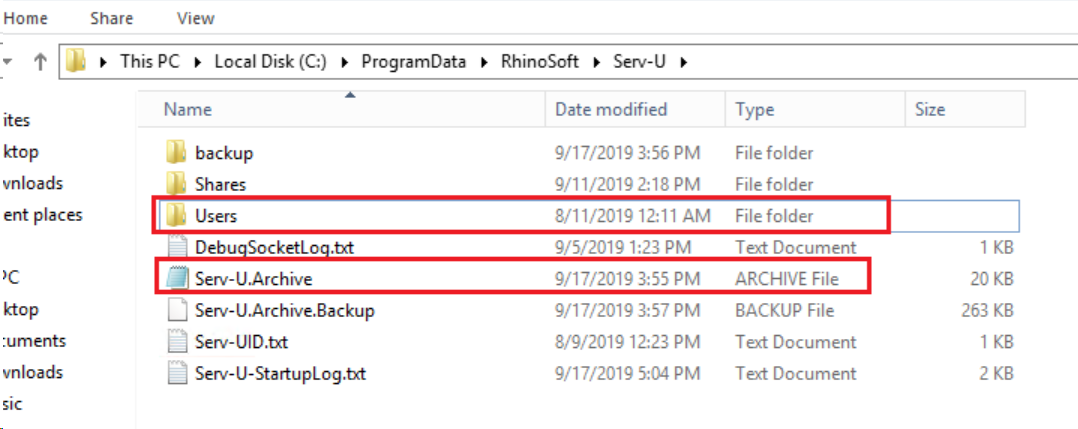
Backup Serv-U configuration:
Implementation Steps:
1. Go to Serv-U management console>Domain Level
2. Go to Users menu and then click Export.
3. Choose where you want to save the file.
4. At the bottom part, type the Servu-Users.csv.
5. Select your preferred output when exporting (Yes - to export all users in this domain/server or No - to export users in this user collection only).
6. Once done, close the export menu.
7. Browse the file using Microsoft Excel
Note: Before doing any changes, create a backup of the file
8. Perform a Find and Replace feature and update values of the HomeDir and DirAccess column with the new home directory
9. Save the File
10. Go back to Serv-U Management Console and delete all Users
12. Go to Users menu and then click Import
13. Browse the CSV File
14. Confirm if the Home Directory is now updated.
Backup Serv-U configuration:
Implementation Steps:
1. Go to Serv-U management console>Domain Level
2. Go to Users menu and then click Export.
3. Choose where you want to save the file.
4. At the bottom part, type the Servu-Users.csv.
5. Select your preferred output when exporting (Yes - to export all users in this domain/server or No - to export users in this user collection only).
6. Once done, close the export menu.
7. Browse the file using Microsoft Excel
Note: Before doing any changes, create a backup of the file
8. Perform a Find and Replace feature and update values of the HomeDir and DirAccess column with the new home directory
9. Save the File
10. Go back to Serv-U Management Console and delete all Users
12. Go to Users menu and then click Import
13. Browse the CSV File
14. Confirm if the Home Directory is now updated.