
Tools
How To Renew An Expired Office 365 Token In WHD
This article describes how to renew Office 365 OAuth Token when WHD stops processing email
First published date
9/16/2020 6:54 PM
Last published date
10/8/2020 4:05 PM
Overview
The lifespan of the O365 OAuth refresh token is fixed at 90 days, no matter how much it is used. When the time period passes, the token will expire and the connection to 0365 mailbox will break. When this happens, you'll see an error similar to the one below in the Incoming Mail Account History
Error processing mailbox messages: OAuth token request failed (statusCode: 400): invalid_grant [700082] AADSTS700082: The refresh token has expired due to inactivity. The token was issued on 2020-05-11T17:20:18.9364763Z and was inactive for 90.00:00:00.
Error processing mailbox messages: OAuth token request failed (statusCode: 400): invalid_grant [700082] AADSTS700082: The refresh token has expired due to inactivity. The token was issued on 2020-05-11T17:20:18.9364763Z and was inactive for 90.00:00:00.
Product section
Web Help Desk
Cause
This is happening because the OAuth refresh token has expired.
Resolution
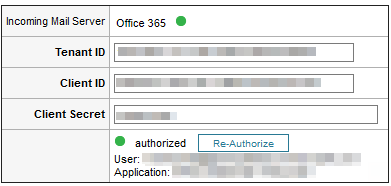
The connection needs to be re-authorized to get it working again. To do so:
Note: You can do this periodically (without waiting for the token to expire) to avoid interruption.
- Navigate to Setup > Email > Incoming Mail Account > [Select Account]
- Click on the Re-Authorize button to refresh your token store with new refresh tokens
Note: You can do this periodically (without waiting for the token to expire) to avoid interruption.