
Tools
How To Create Automated or Recurring Reports in the Service Desk - ITSM
This article lists the steps on how to configure a pre-generated report that is scheduled to be sent depending on the customer's preferred frequency.
First published date
3/14/2023 11:46 AM
Last published date
3/14/2023 11:46 AM
Product section
Service Desk
Cause
When a customer asks how to create reports that get sent regularly to specific groups or users.
Resolution
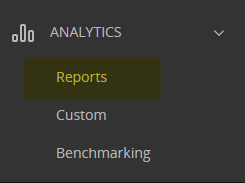
From the service desk homepage, go to Analytics > Reports and select the report template based on the data needed.
Related documentation: https://documentation.solarwinds.com/en/success_center/swsd/content/completeguidetoswsd/analytics-reports.htm
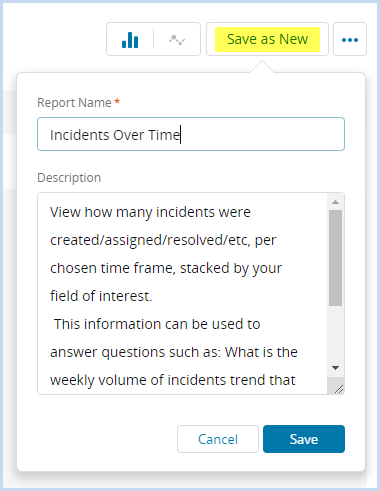
- Generate the data for the particular report, then click Save as New and specify the Report Name, then click Save.
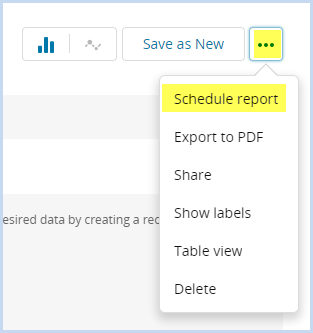
- Once saved, click the menu button and select Schedule Report.
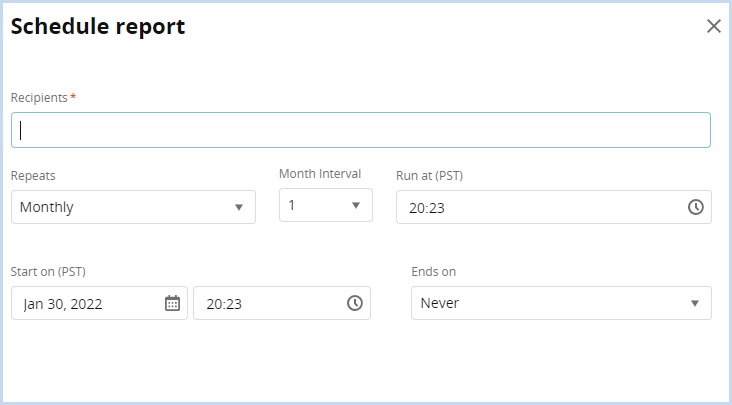
- From here, you can specify who will receive the report and the frequency of when the report is generated.
Related documentation: https://documentation.solarwinds.com/en/success_center/swsd/content/completeguidetoswsd/analytics-reports.htm