
Applications Systems
High Player Load on Player Location and Transactions Not Playing
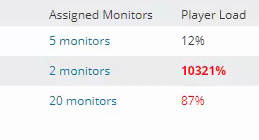
Transactions are not playing. Transactions are unknown. Player location show over 100% player load. High player load on the server.
First published date
11/20/2019 7:03 PM
Last published date
11/26/2019 5:15 PM
Overview
Utilize this article to troubleshoot a high player load along with unknown transactions. If you see find high player load with unknown transactions, remote desktop to the player server and check the following log file:
%ProgramData%\SolarWinds\Logs\SEUM\AgentService.Log
Look for failure to create worker process message near the latest entry:
ERROR SolarWinds.SEUM.Agent.WorkerProcessManagement.WorkerProcessLauncher - Error launching worker process.
System.Exception: Error launching worker process. Error: logon error. System error: 0x569
at SolarWinds.SEUM.Agent.WorkerProcessManagement.WorkerProcessLauncher.LaunchWorkerProcessInCurrentSession()
at SolarWinds.SEUM.Agent.WorkerProcessManagement.WorkerProcessLauncher.LaunchWorkerProcessInternal()
ERROR SolarWinds.SEUM.Agent.WorkerProcessManagement.WorkerProcessManager - Unable to create worker process. Trying again.
Example of high player load
%ProgramData%\SolarWinds\Logs\SEUM\AgentService.Log
Look for failure to create worker process message near the latest entry:
ERROR SolarWinds.SEUM.Agent.WorkerProcessManagement.WorkerProcessLauncher - Error launching worker process.
System.Exception: Error launching worker process. Error: logon error. System error: 0x569
at SolarWinds.SEUM.Agent.WorkerProcessManagement.WorkerProcessLauncher.LaunchWorkerProcessInCurrentSession()
at SolarWinds.SEUM.Agent.WorkerProcessManagement.WorkerProcessLauncher.LaunchWorkerProcessInternal()
ERROR SolarWinds.SEUM.Agent.WorkerProcessManagement.WorkerProcessManager - Unable to create worker process. Trying again.
Example of high player load
Product section
Web Performance Monitor
Cause
Insufficient permissions to launch worker process.
Resolution
Provide local administrator rights to all local SEUM users.
- RDP to the affected player location.
- Start > Run > compmgmt.msc
- Local Users and Groups > Groups > Administrators > [right-click] properties.
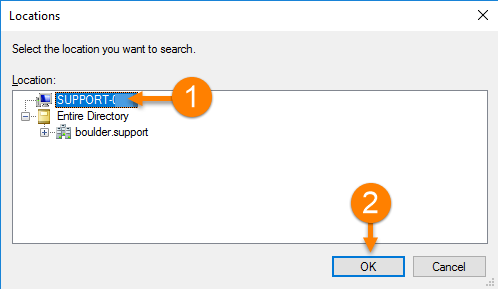
- Edit the Administrators group > click on 'Add...' > Click on 'Locations...'
- Change the location to the server. Click the server name then click OK.
- Click 'Advanced' > Click 'Find Now'
- Shift-click all SEUM users from the list and once highlighted, click OK. Then click the next OK.
- Click Apply.