
Network Management
High Availability (HA) status changes to OFF when using non-Windows AD domains and DNS server
SolarWinds High Availability (HA) status continually changes to "Off" after the server status has been turned on, regardless of whether the DNS server is operational and pointed to correct hostnames.
First published date
8/15/2019 5:16 PM
Last published date
8/15/2019 5:16 PM
Overview
A non-Windows active directory domain server's high availability status continually changes to "Off" after the site status has been turned on. This occurs regardless of whether the DNS server is operational and pointed to the correct host name.
Product section
Orion Platform
Cause
The log file located in C:\Users\All Users\SolarWinds\Logs\HighAvailability\ contains the following error:
2019-01-25 11:43:20,074 [40] ERROR SolarWinds.HighAvailability.Kernel.Communication.SlaveServiceProxy - Error occurred during second Synchronize init and call.
System.ServiceModel.EndpointNotFoundException: No DNS entries exist for host solar1-3. ---> System.Net.Sockets.SocketException: No such host is known
at System.Net.Dns.GetAddrInfo(String name)
at System.Net.Dns.InternalGetHostByName(String hostName, Boolean includeIPv6)
at System.Net.Dns.GetHostEntry(String hostNameOrAddress)
at System.ServiceModel.Channels.DnsCache.Resolve(Uri uri)
— End of inner exception stack trace —
The system is attempting to find the host name without the FQDN. This error is also shown when running configuration wizard for standby server:
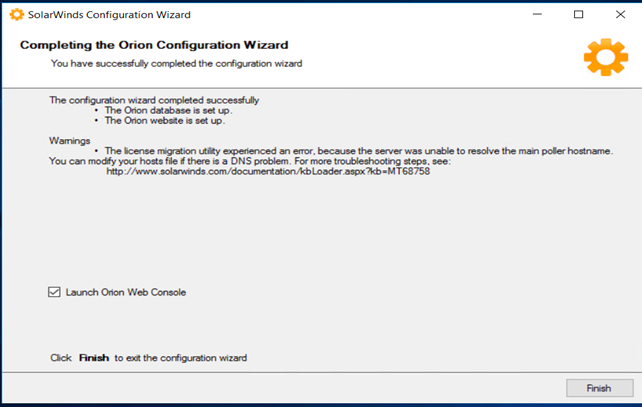
The license migration utility experienced an error, because the server was unable to resolve the main poller hostname. You can modify your hosts file if there is a DNS problem.
Resolution
- Before running the Configuration Wizard, add hostnames with the FQDN as well as for both Solarwinds servers. If you know the FQDN, mask the domain name to sanitize:
- It is important to add the host names prior to running the configuration wizard. The host names are not accepted if added after completing the setup using the wizard.
- After adding the host names, run the configuration wizard. The resulting completion screen should display with no errors:
- Note: depending on database performance and connection status, Orion Platform Failover Engine sync to other servers can take several minutes to complete.
- Open the Orion Platform to confirm HA status is ON and operational for configured servers.