
Network Management
High Availability Pool cannot be Enabled: The pool cannot be enabled. The products and product version of all pool members must match.
This article shows how to quickly resolve an issue where the High Availability Pool is Disabled: The pool cannot be enabled. The products and product version of all pool members must match.
First published date
8/22/2021 10:25 PM
Last published date
8/22/2021 10:25 PM
Overview
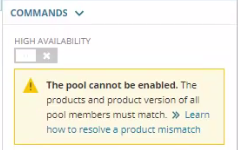
Under SETTINGS > My Orion Deployment - High Availability Summary page the Pool cannot be enabled. as similarly shown below:
Product section
Network Performance Monitor
Cause
High Availability Pool will remain disabled due to the installed module/s OR module version mismatch between the Active and Standby servers.
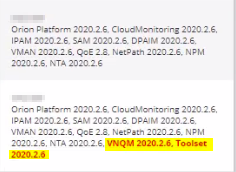
-OR-
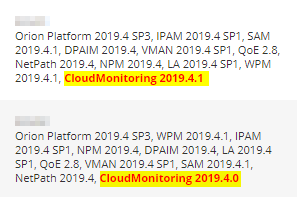
-OR-
Resolution
- RDP to the affected Active or Standby server
- Install/Uninstall the module/s OR Upgrade the module/s version to match in between servers
- Complete the Configuration Wizard