
Applications Systems
Hardware polling failed: Polling of chassis (CIM_Chassis class) failed. Unable to connect to the remote server error in SAM
Hardware health polling failing. Unable to connect to the remote server. Internet browser MOB error: 503 Service Unavailable (Failed to connect to endpoint
First published date
8/15/2019 5:38 PM
Last published date
2/25/2025 8:48 PM
Overview
Addresses issues with hardware health polling of vmware device. When error is found in the web console:
Hardware polling failed: Polling of chassis (CIM_Chassis class) failed. Unable to connect to the remote server
Sample Screenshot
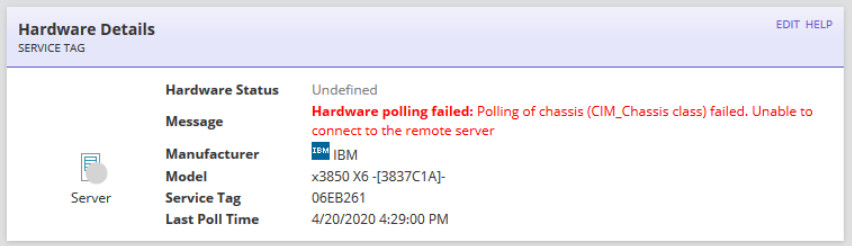
Error in HardwareHealth Collector Jobs
2020-04-21 02:49:00,634 [STP SmartThreadPool Thread #258482] ERROR SolarWinds.Management.Wbem.WbemClientCimXml - OuterException:
System.Net.WebException: Unable to connect to the remote server ---> System.Net.Sockets.SocketException: No connection could be made because the target machine actively refused it 10.29.x.x:5989
Hardware polling failed: Polling of chassis (CIM_Chassis class) failed. Unable to connect to the remote server
Sample Screenshot
Error in HardwareHealth Collector Jobs
2020-04-21 02:49:00,634 [STP SmartThreadPool Thread #258482] ERROR SolarWinds.Management.Wbem.WbemClientCimXml - OuterException:
System.Net.WebException: Unable to connect to the remote server ---> System.Net.Sockets.SocketException: No connection could be made because the target machine actively refused it 10.29.x.x:5989
Product section
Server Application Monitor
Cause
Possible causes
1. Cannot connect to vCenter MOB to retrieve hardware health details.
2. Port 5989 is being blocked.
3. CIM Services are disabled.
1. Cannot connect to vCenter MOB to retrieve hardware health details.
2. Port 5989 is being blocked.
3. CIM Services are disabled.
Resolution
1. Test connectivity to the vCenter or ESX MOB
3. Ensure CIM is enabled on the ESX server.
ESX
Restart CIM services by running the following commands
Restart the CIM provider by running the following commands:
- RDP to the Orion polling engine
- Open a web browser
- Go to one of the following, replace the esxhostname or vcenterhostname wth the actual IP or hostname of your server (ideally by IP address).
https://esxhostname/mob
or
https://vcenterhostname/mob - Proceed past the self-signed certificate
- Log in with your ESX host or vCenter credentials
- If you receive an error, contact vmware support. If you do not receive an error, contact Solarwinds Support
3. Ensure CIM is enabled on the ESX server.
ESX
Restart CIM services by running the following commands
service sfcbd stop
service sfcbd start
ESXi
Restart the CIM provider by running the following commands:
esxcli system settings advanced set -o /UserVars/CIMProviderName -i 0
esxcli system settings advanced set -o /UserVars/CIMProviderName -i 1
Restart the SFCBD agent by running the following command to allow the changes to take effect.
/etc/init.d/sfcbd-watchdog restart