
Network Management
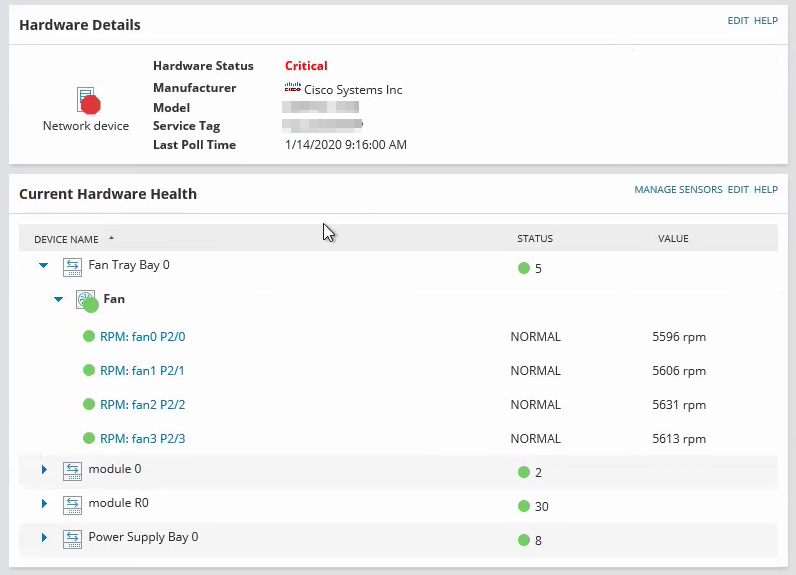
Hardware Details Status shows Critical
Hardware Health status is critical for a node but none of the sensors are critical. Hardware health is critical, warning, unknown. Polling is not working hardware health MIB not working.
First published date
1/14/2020 8:07 PM
Last published date
5/10/2022 1:54 PM
Overview
The parent status of the hardware health is displaying critical. However, all the sensors are in a Up/green status. This image illustrates an example of this occurring.
Product section
Orion Platform
Cause
Several known reasons
- Some sensors for the node are in a critical or unknown status.
- Incorrect MIB for Cisco device.
- Stale sensors in the database need to be cleared.
Resolution
Check the status of all sensors on the node, if there are critical sensors it will cause the parent status to become critical. You may toggle the sensor off or resolve the root problem on the physical device.
You may change the MIB used to poll the device if the manufacturer is CIsco.
See related: Inaccurate Cisco hardware health is in warning or critical state
Check the database for stale entries of sensor statuses that are in critical status.
*[HWH_HardwareInfo].[ID] = [HWH_HardwareItem].[HardwareInfoID]
If the device HWH sensor shows in a warning or critical status, and this has been determined as not an issue, you may modify the custom thresholds for the specific sensor.
See here: Enable, disable, or adjust hardware health sensors.
As a last resort, you may delete the Hardware Health entry from the database, this will re-poll the sensors for the node. Any stale data will be dropped in the process.
You may change the MIB used to poll the device if the manufacturer is CIsco.
See related: Inaccurate Cisco hardware health is in warning or critical state
Check the database for stale entries of sensor statuses that are in critical status.
| Table Name | Column Name | Details |
|---|---|---|
| [dbo].[HWH_HardwareInfo] | [CategoriesWithProblems], [CategoriesWithStatus] | Check to see if critical status sensors exist in the CategoriesWithProblems |
| [dbo].[HWH_HardwareItem] | *[HardwareCategoryStatusID], [IsDeleted] | Check to see if the CategoriesWithProbems have any enabled sensors available, this will affect the parent HWH status |
If the device HWH sensor shows in a warning or critical status, and this has been determined as not an issue, you may modify the custom thresholds for the specific sensor.
See here: Enable, disable, or adjust hardware health sensors.
As a last resort, you may delete the Hardware Health entry from the database, this will re-poll the sensors for the node. Any stale data will be dropped in the process.