
Applications Systems
SAM HTTP/HTTPS Monitor Failed: (403) Forbidden
The remote server returned an error: (403) Forbidden. The http or https monitor is not working. HTTP and HTTPS monitors are down. Using proxy, proxy not working, configuring http monitor to use proxy. These messages have been known to be found when using a Proxy. Proxy settings not set correctly. User does not have access to proxy. Application is in a down status.
First published date
11/20/2019 6:24 PM
Last published date
6/16/2025 4:57 PM
Overview
This article helps to troubleshoot issues with failing SAM HTTP and HTTPS monitors with the following error:
Access denied, authorization failed. HTTP 403. Forbidden. The remote server returned an error: (403) Forbidden.
This has been known to be caused by a misconfigured proxy or a proxy that is not able to be accessed. It is advised to determine if proxy settings are needed for the server to access the website prior to troubleshooting. If using a proxy, you will also need to determine if credentials are required to use the proxy.
The message appears on the application details page of the web console.
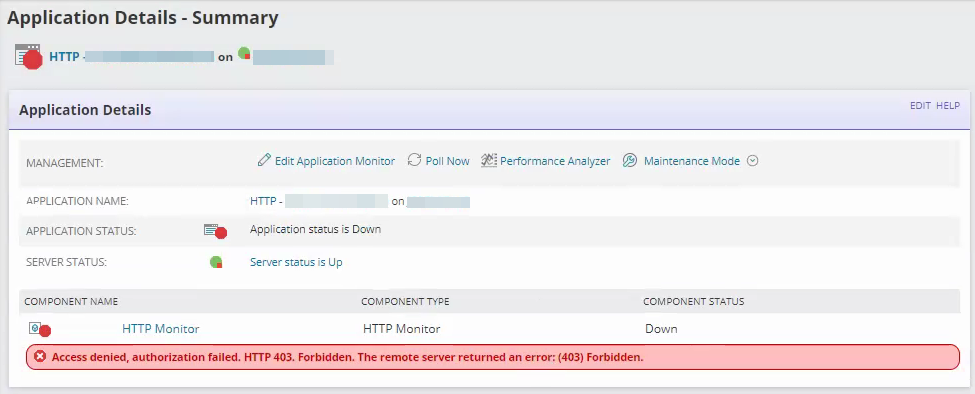
Enabling application debugging for SAM may provide the full error stack:
ERROR SolarWinds.APM.Probes.HTTP.HttpProbeBase`1 - WebException caught.
System.Net.WebException: The remote server returned an error: (403) Forbidden.
at System.Net.HttpWebRequest.EndGetResponse(IAsyncResult asyncResult)
at SolarWinds.APM.Probes.HTTP.HttpClientHelper.GetWebResponse(WebRequest request)
at SolarWinds.APM.Probes.HTTP.HttpClientHelper.GetWebResponseFromUri(Uri address, IStopwatch stopwatch)
at SolarWinds.APM.Probes.HTTP.HttpClientHelper.Download(Uri address, IStopwatch stopwatch, Encoding encoding)
at SolarWinds.APM.Probes.HTTP.HttpProbeBase`1.ProbeInternal(ProbeInformation probeInfo, HttpMonitorResult result)
Access denied, authorization failed. HTTP 403. Forbidden. The remote server returned an error: (403) Forbidden.
This has been known to be caused by a misconfigured proxy or a proxy that is not able to be accessed. It is advised to determine if proxy settings are needed for the server to access the website prior to troubleshooting. If using a proxy, you will also need to determine if credentials are required to use the proxy.
The message appears on the application details page of the web console.
Enabling application debugging for SAM may provide the full error stack:
ERROR SolarWinds.APM.Probes.HTTP.HttpProbeBase`1 - WebException caught.
System.Net.WebException: The remote server returned an error: (403) Forbidden.
at System.Net.HttpWebRequest.EndGetResponse(IAsyncResult asyncResult)
at SolarWinds.APM.Probes.HTTP.HttpClientHelper.GetWebResponse(WebRequest request)
at SolarWinds.APM.Probes.HTTP.HttpClientHelper.GetWebResponseFromUri(Uri address, IStopwatch stopwatch)
at SolarWinds.APM.Probes.HTTP.HttpClientHelper.Download(Uri address, IStopwatch stopwatch, Encoding encoding)
at SolarWinds.APM.Probes.HTTP.HttpProbeBase`1.ProbeInternal(ProbeInformation probeInfo, HttpMonitorResult result)
Product section
Server Application Monitor
Cause
- Using proxy
- Misconfigured component settings.
- Server cannot access the site.
Resolution
Ensure the server can reach the website (i.e. check to make sure the website is not blacklisted and firewall rules allow for the server to reach the website).
Check the polling method of the assigned node.
Note: when entering proxy url into the component monitor settings, SWIS variables (e.g. ${IP}) are filled in based on the assigned node. A majority of the time, you must completely remove the default value within the Proxy URL field and modify the url to your specific address.

If you experience errors in the above commands, contact your web administrator and/or network team to troubleshoot the connection issue further.
If you do not experience errors in PowerShell, contact SolarWinds support or continue troubleshooting with alternative article suggestions. See HTTP/HTTPS SAM Monitors Not Working for more troubleshooting assistance.
Check the polling method of the assigned node.
- For agent polled nodes: RDP to the agent machine for troubleshooting.
- For non-agent polled machines: RDP to the polling engine assigned to the node.
Note: this information can be checked on the Manage Nodes page. Add columns for polling engines, add column for polling method if columns are not present.
Test in PowerShell
Once on the server, open PowerShell session as administrator.
- Enter command:
# Scripts are not supported under any SolarWinds support program or service. # Scripts are provided AS IS without warranty of any kind. SolarWinds further # disclaims all warranties including, without limitation, any implied warranties # of merchantability or of fitness for a particular purpose. The risk arising # out of the use or performance of the scripts and documentation stays with you. # In no event shall SolarWinds or anyone else involved in the creation, # production, or delivery of the scripts be liable for any damages whatsoever # (including, without limitation, damages for loss of business profits, business # interruption, loss of business information, or other pecuniary loss) arising # out of the use of or inability to use the scripts or documentation. Invoke-WebRequest -Uri http://sitename/ - If using a proxy:
Invoke-WebRequest -Uri http://google.com -Proxy http://x.x.x.x/ -ProxyCredential [optional]
ProxyCredential is an optional argument that you should only use if your proxy is set up to use credentials. - For status code output:
Invoke-WebRequest -Uri http://google.com -UseBasicParsing | Select -ExpandProperty StatusCode
Note: when entering proxy url into the component monitor settings, SWIS variables (e.g. ${IP}) are filled in based on the assigned node. A majority of the time, you must completely remove the default value within the Proxy URL field and modify the url to your specific address.
If you experience errors in the above commands, contact your web administrator and/or network team to troubleshoot the connection issue further.
If you do not experience errors in PowerShell, contact SolarWinds support or continue troubleshooting with alternative article suggestions. See HTTP/HTTPS SAM Monitors Not Working for more troubleshooting assistance.