
Network Management
Gmail Google as an SMTP Relay for Orion Alerts
This page describes steps to successfully use Gmail and Google as an SMTP relay host.
First published date
4/10/2020 6:55 AM
Last published date
11/22/2022 4:02 PM
Overview
In order to be able to use Office 365 or Google as an SMTP relay host, additional properties need to be added. The same goes for when this is hosted on the Azure platform with 2-factor authentication.
Product section
Orion Platform
Resolution
Before setting up Gmail please follow the steps below
You must open your Gmail account on the Actual Orion Main Primary Server only then the Gmail account will work to recognize the device for the Gmail security
Open your Gmail account Click on the icon (Top Right ) Manage your Google Account > Security >
Less secure app access > Allow less secure app ON




Once Done
Setup SMTP Server :
Settings > All Settings > Manage SMTP Servers
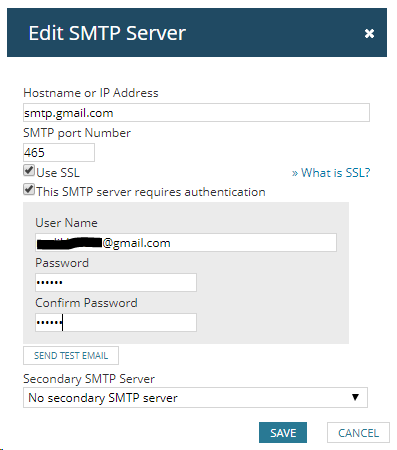
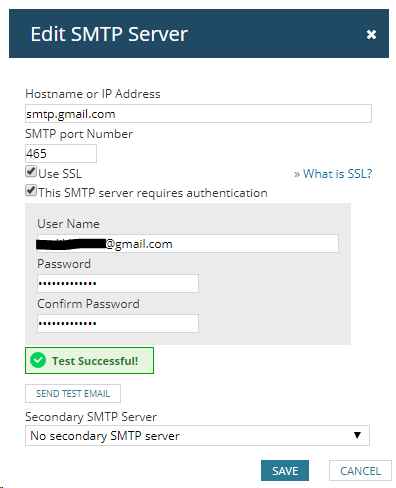
Another option if the SMTP Test is failing is to use port 587.
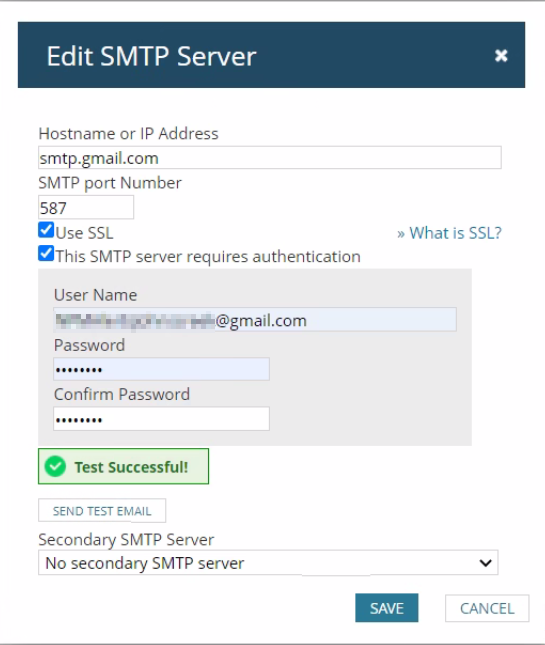
In case of any failure with the SMTP Test please check the following logs for any error reported for any Authentication or communication failure
C:\ProgramData\SolarWinds\Logs\Orion\Core.BusinessLayer.log
Do you have any issue with Orion Alerting ?
This article will help you to quickly isolate the issue when you have any difficulty / issues with Orion Alerts as below checking your current installed environment . This article also contained an example case study and resolution steps involved for further assistance to make it easy to use and understand the basic troubleshooting the Alerts area
Disclaimer: Please note, any content posted herein is provided as a suggestion or recommendation to you for your internal use. This is not part of the SolarWinds software or documentation that you purchased from SolarWinds, and the information set forth herein may come from third parties. Your organization should internally review and assess to what extent, if any, such custom scripts or recommendations will be incorporated into your environment. You elect to use third party content at your own risk, and you will be solely responsible for the incorporation of the same, if any.
You must open your Gmail account on the Actual Orion Main Primary Server only then the Gmail account will work to recognize the device for the Gmail security
Open your Gmail account Click on the icon (Top Right ) Manage your Google Account > Security >
Less secure app access > Allow less secure app ON
Once Done
Setup SMTP Server :
Settings > All Settings > Manage SMTP Servers
Another option if the SMTP Test is failing is to use port 587.
In case of any failure with the SMTP Test please check the following logs for any error reported for any Authentication or communication failure
C:\ProgramData\SolarWinds\Logs\Orion\Core.BusinessLayer.log
*** SolarWinds Core Business Layer v2019.4.5200.9045, .Net Runtime v4.0.30319 ***
2020-04-09 22:26:33,733 [238] ERROR SolarWinds.Orion.Core.Actions.Impl.Email.EmailMethodInvoker - (null)  Test for SMTP server (192.168.1.xx:25, SSL disabled, Authentication enabled) failed
System.Net.Mail.SmtpException: The SMTP server requires a secure connection or the client was not authenticated. The server response was: SMTP authentication is required.
Do you have any issue with Orion Alerting ?
This article will help you to quickly isolate the issue when you have any difficulty / issues with Orion Alerts as below checking your current installed environment . This article also contained an example case study and resolution steps involved for further assistance to make it easy to use and understand the basic troubleshooting the Alerts area
Quick check list for Orion Alerts through installed environment and polling area
In case of Failure (Collect Full Orion Diagnostics and Open Support Ticket )
Still need assistance from Solarwinds Support
Tips and Tricks on opening a Support Ticket with SolarWinds
Disclaimer: Please note, any content posted herein is provided as a suggestion or recommendation to you for your internal use. This is not part of the SolarWinds software or documentation that you purchased from SolarWinds, and the information set forth herein may come from third parties. Your organization should internally review and assess to what extent, if any, such custom scripts or recommendations will be incorporated into your environment. You elect to use third party content at your own risk, and you will be solely responsible for the incorporation of the same, if any.