
Tools
Generate ECDSA SSH Private Key and configure in Serv-U
This article demonstrates how to generate ECDSA SSH private key.
First published date
10/12/2020 11:39 PM
Last published date
3/4/2022 6:53 PM
Overview
Serv-U supports different types of SSH Private Keys such as DSA and RSA. In the Serv-U management console, you can generate only this type of SSH keys. In this case, if it's required to have this for security reasons and the SFTP client only works on this type of key. It can be generated using a 3rd party tool called PuTTYgen and other similar SSH key generator.
Product section
Serv-U Managed File Transfer & Serv-U FTP Server
Resolution
Create ECDSA Key using PuTTYgen
1. Install and open PuTTYgen.
2. Under Parameters, select ECDSA as the type of key.

3. Click Generate then follow the instruction on the screen.
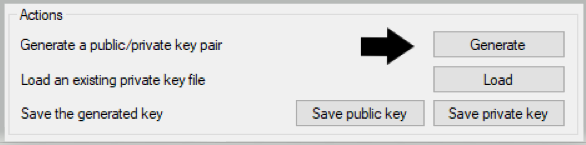
4. Click Save private key.
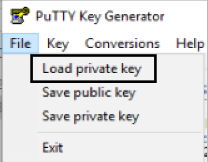
5. Convert the .PPK private key to OpenSSH key, in the PuTTY Key Generator, click File then select the Load Private Key.
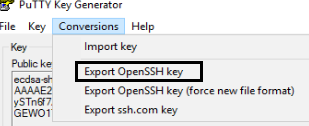
6. Browse the .PPK private key, click the Conversion tab, select the Export OpenSSH key, Save it.
5. Configure in Serv-U, see the Domain Encryption for SFTP, Use an existing private key.
1. Install and open PuTTYgen.
2. Under Parameters, select ECDSA as the type of key.
3. Click Generate then follow the instruction on the screen.
4. Click Save private key.
5. Convert the .PPK private key to OpenSSH key, in the PuTTY Key Generator, click File then select the Load Private Key.
6. Browse the .PPK private key, click the Conversion tab, select the Export OpenSSH key, Save it.
5. Configure in Serv-U, see the Domain Encryption for SFTP, Use an existing private key.