
Network Management
GPO is blocking Powershell and impacting Orion Upgrade
Some GPO configured can prevent the content.psd1 Powershell file from being executed and it impacts the Orion installer.
First published date
11/13/2023 10:20 AM
Last published date
2/21/2025 10:03 PM
Overview
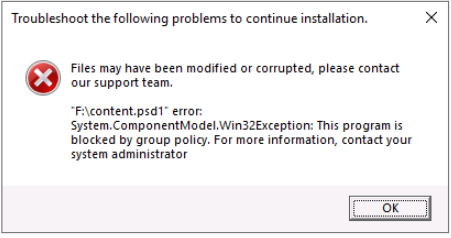
During the upgrade/fresh install the SolarWinds Offline installer may throw below error:
Note, the issue is mostly observed in Offline installation scenarios.
"Files may have been modified or corrupted, please contact our support team.
"F:\content.psd1 error:
System.ComponentModel.Win32Exception: This program is blocked by group policy. For more information, contact your system administrator."
Note, the issue is mostly observed in Offline installation scenarios.
Product section
Orion Platform
Cause
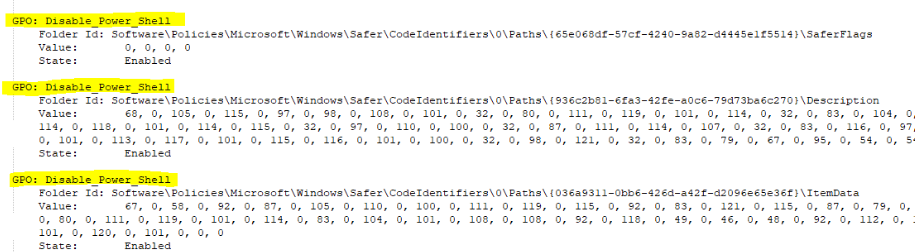
As was mentioned in the screenshot above, some GPOs are blocking the powershell.exe, which prevents the installer from running installation scripts.
You can check if some GPOs are blocking Powershell by running the following command in the Orion server.
#gpresult
It can show a result like this:
(Screenshots property of Microsoft Corporation © 2023 Microsoft Corporation)
You can check if some GPOs are blocking Powershell by running the following command in the Orion server.
#gpresult
It can show a result like this:
(Screenshots property of Microsoft Corporation © 2023 Microsoft Corporation)
Resolution
Resolution 1:
Disable the GPO that is preventing Powershell from being executed and rerun the installer.
Resolution 2:
If you can't disable the GPO temporarily at least, then:
1. Mount the Offline ISO
2. Copy SolarWinds.Installer.exe and all contents of SubInstallers folder to (C:\ProgramData\SolarWinds\Installers)
3. Go to Settings > My Deployment > Update to use the Centralized web console-based update tool to upgrade.
Disable the GPO that is preventing Powershell from being executed and rerun the installer.
Resolution 2:
If you can't disable the GPO temporarily at least, then:
1. Mount the Offline ISO
2. Copy SolarWinds.Installer.exe and all contents of SubInstallers folder to (C:\ProgramData\SolarWinds\Installers)
3. Go to Settings > My Deployment > Update to use the Centralized web console-based update tool to upgrade.