
Network Management
Forcing the Business Layer to load plugins in a separate or 64-bit process
Enabling ForcePluginsInSeparateProcess when encountering system out of memory exception for the main business layer module
First published date
10/29/2018 2:28 AM
Last published date
1/17/2025 11:03 PM
Overview
This article provides information about changing the Business Layer (Module Engine) behavior to load plugins as separate processes, as opposed to a single process (default). It is especially beneficial in large or complex environments having OOM (Out-Of-Memory) issues.
Product section
Orion Platform
Resolution
Resolution 1
- Log in to the Orion Web Console.
- Access the Centralized Settings feature by adding the following to the URL:
<OrionServer>/Orion/Admin/AdvancedConfiguration/Global.aspx
For example:<server_name>:8787/Orion/Admin/AdvancedConfiguration/Global.aspx
- Select the GLOBAL tab to apply the setting to all servers, or select the SERVER-SPECIFIC tab to select a specific server.
- Scroll down to the section
SolarWinds.BusinessLayerHost.BusinessLayerHostSettingsand locate theForcePluginsInSeparateProcesssetting.
Orion version 2024.1 onwards it would be located under BusinessLaterHost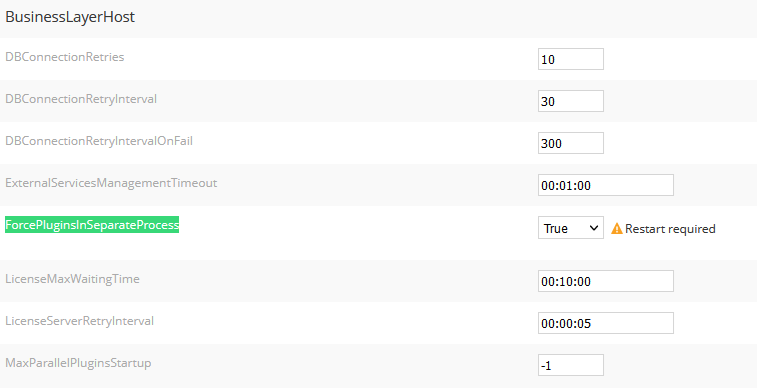
-
True - Always use separate processes.
-
False - Always use a single process.
-
Auto (default) - If enough memory (8 GB) is installed and the Orion database is not on the same machine, separate process are used
5. Click Save.
6. Restart the Orion Services.
Resolution 2
You can run the following query in the Orion DB:
- Stop the Orion services.
- Run the query below.
-- Scripts are not supported under any SolarWinds support program or service.
-- Scripts are provided AS IS without warranty of any kind. SolarWinds further
-- disclaims all warranties including, without limitation, any implied warranties
-- of merchantability or of fitness for a particular purpose. The risk arising
-- out of the use or performance of the scripts and documentation stays with you.
-- In no event shall SolarWinds or anyone else involved in the creation,
-- production, or delivery of the scripts be liable for any damages whatsoever
-- (including, without limitation, damages for loss of business profits, business
-- interruption, loss of business information, or other pecuniary loss) arising
-- out of the use of or inability to use the scripts or documentation.

INSERT INTO Setting (Name, Value) VALUES ('SolarWinds.BusinessLayerHost.BusinessLayerHostSettings.ForcePluginsInSeparateProcess', 'True')
- Restart the Orion Services