
Network Management
Troubleshooting HTTP Post - Failed to execute HTTP request
This article provides information on how to troubleshoot the alert action HTTP/s GET and Post showing "Failed to execute HTTP request"
First published date
11/21/2021 9:28 PM
Last published date
2/8/2025 12:06 AM
Overview
This article provides information about possible error(s) you may see when performing HTTP/S alert GET/POST actions in Solarwinds Orion platform.
The common error you see in GUI is when you do Simulat alert action execution is 'Failed to execute HTTP request'
However, logs may have more details info about exact causes.
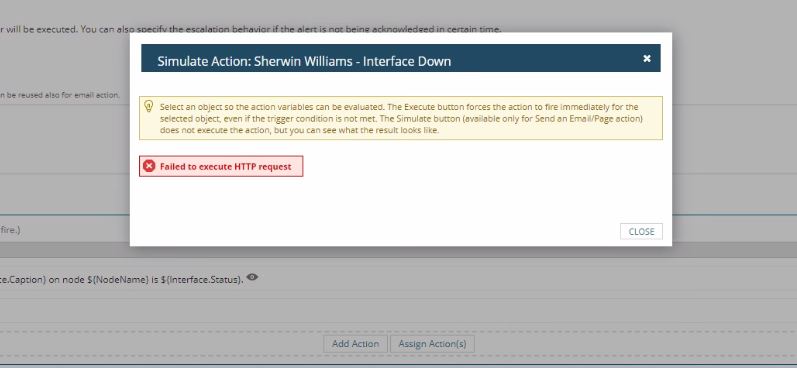
The common error you see in GUI is when you do Simulat alert action execution is 'Failed to execute HTTP request'
However, logs may have more details info about exact causes.
Product section
Orion Platform
Cause
- Multiple factors depending on the errors generated in AlertExecutionAlert.log
- Orion Module Engine service account permission
- Missing SSL Certifcate in Trusted Root CA Store
Resolution
Check and verify if the HTTP Post (Script) is working outside of Orion Alert using third party tool like Postman.
If yes, check the AlertExecutionAlert.log and look for the errors
Error 1:
Solution:
2. Confirm the customer does not have multiple websites.
3. Remove the one that should be there.
4. Try to simulate an alert again.
Error 3:
Based on the HTTP Code 426 Error
https://developer.mozilla.org/en-US/docs/Web/HTTP/Status/426
You may need to tweak your HTTP Post script referring to the Upgrade header
Error 4:
The above error was generated when customer was making API Post call to external webserver outside their domain to URL in another domain.
To resolve the issue:
1) On Solarwinds Main poller, please verify if the public and CA Root certs are in Trusted Root CA for Local Computer Store account (not just Local User), because by default alert actions are executed in Local System account context.
2) Make sure the cert issued to external server has not expired, if it is then import the updated cert.
Error 5:
ERROR AlertingLogger - (null) Failed to execute an HTTP request. Method: POST, Url: , Body: {
"title": " RESET: a SQL application on ""is Warning",
"text": "Windows Server 2016 Services and Counters on ""is Warning"
}
System.Net.WebException: The remote server returned an error: (400) Bad Request.
at System.Net.HttpWebRequest.GetResponse()
at SolarWinds.Orion.Core.Actions.Impl.SendHttpRequest.SendHttpRequestExecutor.ExecuteInternal()
Solution 1:
Open the alert in question, navigate to the trigger actions tab, edit the GET/POST action, add 'application/JSON'
to the 'ContentType' section of the 'HTTP/S request settings' tab.
Solution 2: (Syslog Message based rule alert action (POST)
Incase if Type is already set to 'application/JSON' but you have POST action set for Syslog Messages Received from Cisco 9000 Series devices. Then the issue is in the log message, it appends a newline character at the end of message which the Alert Macro variable unable to trim, which breaks the JSON document posted to gateway.
This is confirmed as bug in 2024.1 (OO-29112). Workaround is to use Powershell script to execute external program and POST the JSON via Powershell. Contact support if you need assistance.
If yes, check the AlertExecutionAlert.log and look for the errors
Error 1:
"The remote server returned an error: (503) Server Unavailable."
Solution:
1. Go to services.msc
2. SolarWinds Orion Module Engine > Right Click > Properties
3. Log On tab. Replace it with a Domain or Local Admin service account
4. Save
5. Restart the Orion Module Engine
6. Test again the HTTP GET/POST alert
Error 2:
"Failed to execute HTTP request ---> System.Net.WebException: The request was aborted: The operation has timed out"
Solution:
2. Confirm the customer does not have multiple websites.
3. Remove the one that should be there.
4. Try to simulate an alert again.
Error 3:
System.Exception: Failed to execute HTTP request ---> System.Net.WebException: The remote server returned an error: (426)Solution:
Based on the HTTP Code 426 Error
https://developer.mozilla.org/en-US/docs/Web/HTTP/Status/426
You may need to tweak your HTTP Post script referring to the Upgrade header
Error 4:
System.Exception: Failed to execute HTTP request ---> System.Net.WebException: The underlying connection was closed: Could not establish trust relationship for the SSL/TLS secure channel. ---> System.Security.Authentication.AuthenticationException: The remote certificate is invalid according to the validation procedure.Solution:
The above error was generated when customer was making API Post call to external webserver outside their domain to URL in another domain.
To resolve the issue:
1) On Solarwinds Main poller, please verify if the public and CA Root certs are in Trusted Root CA for Local Computer Store account (not just Local User), because by default alert actions are executed in Local System account context.
2) Make sure the cert issued to external server has not expired, if it is then import the updated cert.
Error 5:
ERROR AlertingLogger - (null) Failed to execute an HTTP request. Method: POST, Url: , Body: {
"title": " RESET: a SQL application on ""is Warning",
"text": "Windows Server 2016 Services and Counters on ""is Warning"
}
System.Net.WebException: The remote server returned an error: (400) Bad Request.
at System.Net.HttpWebRequest.GetResponse()
at SolarWinds.Orion.Core.Actions.Impl.SendHttpRequest.SendHttpRequestExecutor.ExecuteInternal()
Solution 1:
Open the alert in question, navigate to the trigger actions tab, edit the GET/POST action, add 'application/JSON'
to the 'ContentType' section of the 'HTTP/S request settings' tab.
Solution 2: (Syslog Message based rule alert action (POST)
Incase if Type is already set to 'application/JSON' but you have POST action set for Syslog Messages Received from Cisco 9000 Series devices. Then the issue is in the log message, it appends a newline character at the end of message which the Alert Macro variable unable to trim, which breaks the JSON document posted to gateway.
This is confirmed as bug in 2024.1 (OO-29112). Workaround is to use Powershell script to execute external program and POST the JSON via Powershell. Contact support if you need assistance.