
Network Management
Failed: SolarWinds SCP Server - Fatal error during installation.
Installation failed during the upgrade of SolarWinds Orion. Check SolarWinds TFTPServer log file for more details. Failed: SolarWinds TFTPServer - Fatal error during installation.
First published date
12/16/2019 3:48 PM
Last published date
1/17/2023 8:26 AM
Overview
This article provides possible resolution to the error:
"Failed: SolarWinds SCP Server - Fatal error during installation. Check SolarWinds SCP Server log file for more details."
When upgrading the SolarWinds Orion Platform you may run into this error:
Error message from the SftpServerInstaller.msi log file (C:\ProgramData\SolarWinds\Logs\Installer\[Year-Month-Date-Time)

SFTP/SCP Server' (SolarWinds SFTP Server) could not be installed.  Verify that you have sufficient privileges to install system services. Info 1920.Service 'SolarWinds SFTP/SCP Server' (SolarWinds SFTP Server) failed to start.  Verify that you have sufficient privileges to start system services. ExecSecureObjectsRollback:  Error 0x80070424: failed to set security info for object: SolarWinds SFTP Server error code: 1060 CustomAction ExecSecureObjectsRollback returned actual error code 1603 but will be translated to success due to continue marking ExecSecureObjectsRollback:  Error 0x80070424: failed to set security info for object: SolarWinds SFTP Server error code: 1060 CustomAction ExecSecureObjectsRollback returned actual error code 1603 but will be translated to success due to continue marking Action ended 16:04:51: INSTALL. Return value 3. Property(S): Help = C:\Program Files (x86)\SolarWinds\SftpServer\Help\ Property(S): UpgradeCode = {AB0A4612-4F47-4B45-A417-3294288CDB1C}

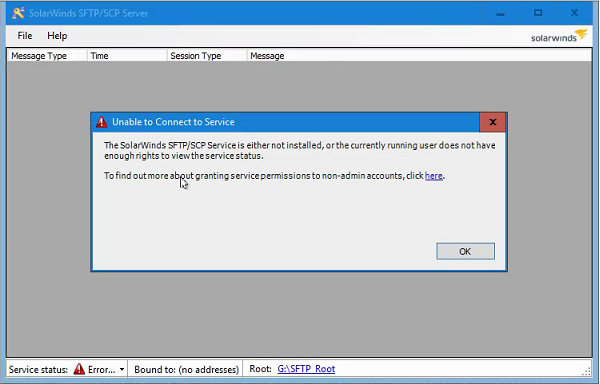
Error when opening the SolarWinds SFTP & SCP Server from start menu:
"The SolarWinds SFTP/SCP Service is either not installed, or the currently/running user does not have enough rights to view the service status.

To find out more about granting service permission to non-admin accounts, click here."
Product section
Network Performance Monitor
Cause
SolarWinds SFTP & SCP Server broken application.
Resolution
- Go to Control Panel > Programs and Features
- Locate the SolarWinds SCP Server and uninstall the program.
- Retry to run the SCP/SFTP installer: the SCP installer should be found in [Orion Server] or Orion Install - Subfolders.C:\ProgramData\SolarWinds\Installers\SFTPSERVERINSTALLER-2.0.0.28-SftpServerInstaller
- If it's unable to complete the sole installation
- Reboot the server
- Re-run again the Orion Installer.
If it's from a complete uninstall Orion, The Orion Installer may show some error and you need to run the Config Wizard first, then immediately kill after it runs. *This will generate the DB connection string*
Then run the Orion Installer again
After uninstalling the older version of the SolarWinds SCP server, reboot the server then try again. If it still fails, contact SolarWinds support.
Check the machine.config file.
- Launch notepad as administrator
- Navigate to C:\Windows\Microsoft.NET\Framework\v4.0.30319\Config\ and select to brows all files (*.*)
- Select machine.config to open and edit
- Search for: <runtime
You should find an entry similar to: <runtime /> - Change it to:
<runtime>
<generatePublisherEvidence enabled="false"/>
</runtime> - Save file
- Disable UAC (User Account Control)