
Applications Systems
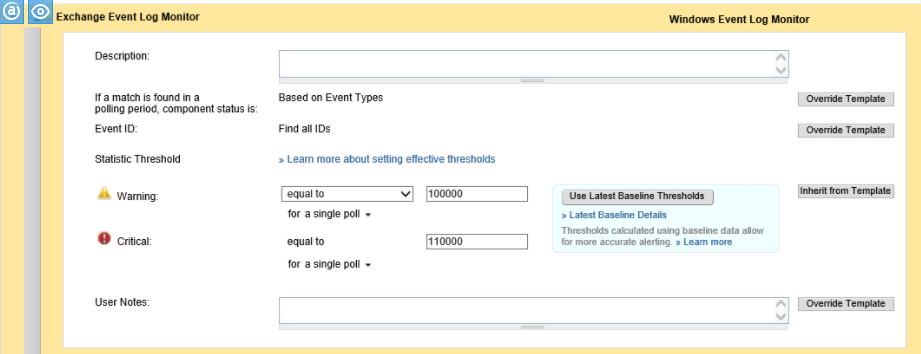
Exchange Event Log Monitor showing warning
This article describes the issue when the Exchange Event log Monitor for Microsoft Exchange shows a warning.
First published date
11/29/2018 10:29 PM
Last published date
11/29/2018 10:29 PM
Overview
This article describes the issue when the Exchange Event log Monitor for Microsoft Exchange is in a Warning or Critical Status.
The Statistic Threshold set to 100000 and Min/Max Log Counts as of the image above displays not below 5.
Product section
Server Application Monitor
Cause
This issue occurs due to a mismatch component set to Based on Event Types.
Resolution
- Go to the application > Edit > Go the Exchange Event Log Monitor > and expand.
- Click Override Template option for if a match is found ina polling period component status is Set it Based on Event Count > click Submit.
- Wait for 10 minutes. This warning should not appear anymore.