
Security Compliance
Exception error displays in Patch Manager web console summary page
Patch Manager Summary view in Orion Web Console throws Exceptions occurred at MM/DD/YYYY. The operation has timed or Error when executing task: Unable to get data.
First published date
10/24/2018 12:51 PM
Last published date
10/19/2022 8:02 AM
Overview
The following error is displayed when accessing any view in the Patch Manager MMC Console:
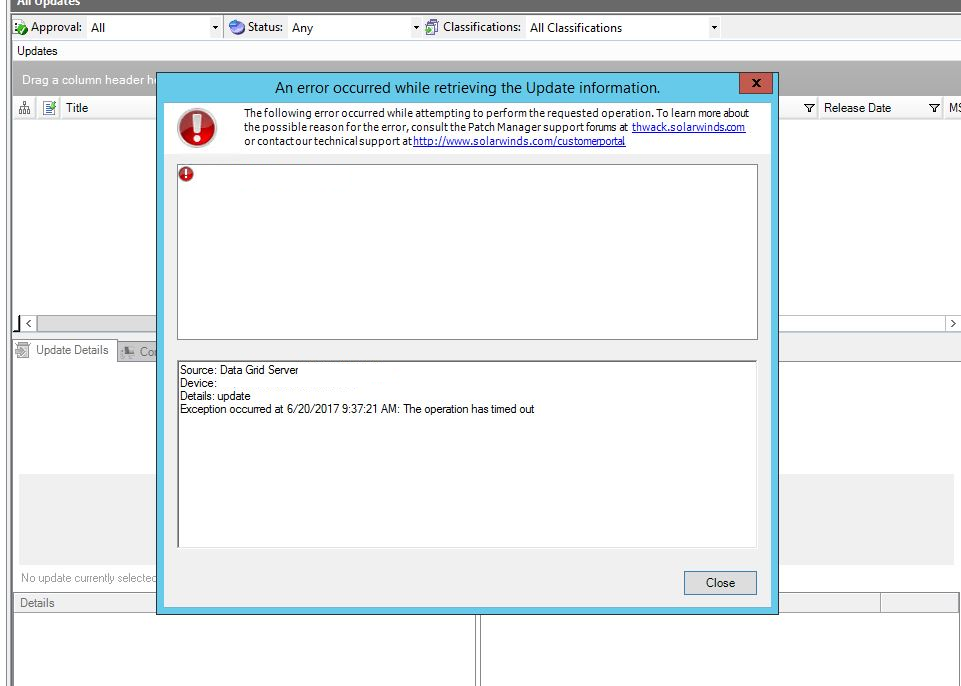
Source: Data Grid Server
Device: XXX
Details: update
Exception occurred at MM/DD/YYYY. The operation has timed out.
And the following error is also displayed in the Patch Manager Web Console. The Data Grid and WSUS services are running fine:
Error when executing task: Unable to get data.
Note: Patch Manager ver 2.1.2 and higher includes the Patch Manager Orion web integration module.
Product section
Patch Manager
Cause
Any of the following activities were performed prior to the issue:
- Patch Manager was recently upgraded / Migrated
- The WSUSContent folder was moved to another drive.
- SQL Server was recently upgraded to 2016.
- Orion Modules were upgraded
- Datagrid Service is Down
- Invalid credentials to access Datagrid service in PM Web settings.
- PM is not able to connect to WSUS server / WSUS having issues.
Resolution
You may start with the simple tasks and check below to verify the cause and fix the issues.
- Verify you are able to Launch PM MMC console and access all the view under Enterprise > Update Services > Select WSUS server and access any of the views.
- Restart Datagrid Service on Primary Patch manager server.
- Make sure Solarwinds Patch manager Web Console (integration module) ver on Solarwinds Server match Solarwinds Patch manager Server console (MMC) version on Primary patch manager server
- On Solarwinds server repair Solarwinds Patch manager Web Console and run the Orion configuration wizard as an administrator and Restart Datagrid Service on Primary Patch manager server
- Run the Patch Manager configuration wizard as an administrator on Patch manager Server
- If any issues with WSUS server then Migrate the WSUS (© 2017 Microsoft Corporation, available at https://blogs.technet.microsoft.com/, obtained on June 23, 2017) content to a new volume.