
Network Management
Error while executing script- UNION ALL view 'SolarWindsOrion.dbo.ResponseTime_CS_Hourly_legacy' is not updatable because a partitioning column was not found.
This article will show how to resolve an issue with the Configuration Wizard Database configuration failed: Error while executing script- UNION ALL view 'SolarWindsOrion.dbo.ResponseTime_CS_Hourly_legacy' is not updatable because a partitioning column was not found.
First published date
3/27/2022 6:55 PM
Last published date
3/27/2022 7:03 PM
Overview
Running the Configuration Wizard hitting the failure below:
Orion Database FAILED
Database configuration failed: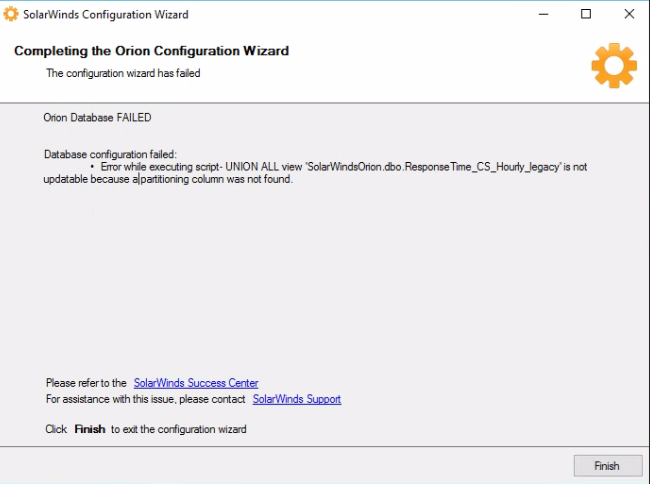
Orion Database FAILED
Database configuration failed:
- Error while executing script- UNION ALL view 'SolarWindsOrion.dbo.ResponseTime_CS_Hourly_legacy' is not updatable because a partitioning column was not found.
Product section
Network Performance Monitor
Cause
The views below are already corrupted and need to be dropped to be recreated:
VIEW [dbo].[ResponseTime_CS_Detail_legacy_U]
VIEW [dbo].[ResponseTime_CS_Hourly_legacy]
VIEW [dbo].[ResponseTime_CS_Detail_legacy_U]
VIEW [dbo].[ResponseTime_CS_Hourly_legacy]
Resolution
Do the following steps with the help of a DBA:
-- Scripts are provided AS IS without warranty of any kind. SolarWinds further
-- disclaims all warranties including, without limitation, any implied warranties
-- of merchantability or of fitness for a particular purpose. The risk arising
-- out of the use or performance of the scripts and documentation stays with you.
-- In no event shall SolarWinds or anyone else involved in the creation,
-- production, or delivery of the scripts be liable for any damages whatsoever
-- (including, without limitation, damages for loss of business profits, business
-- interruption, loss of business information, or other pecuniary loss) arising
-- out of the use of or inability to use the scripts or documentation.
-- Scripts are provided AS IS without warranty of any kind. SolarWinds further
-- disclaims all warranties including, without limitation, any implied warranties
-- of merchantability or of fitness for a particular purpose. The risk arising
-- out of the use or performance of the scripts and documentation stays with you.
-- In no event shall SolarWinds or anyone else involved in the creation,
-- production, or delivery of the scripts be liable for any damages whatsoever
-- (including, without limitation, damages for loss of business profits, business
-- interruption, loss of business information, or other pecuniary loss) arising
-- out of the use of or inability to use the scripts or documentation.
Disclaimer: Please note, any content posted herein is provided as a suggestion or recommendation to you for your internal use. This is not part of the SolarWinds software or documentation that you purchased from SolarWinds, and the information set forth herein may come from third parties. Your organization should internally review and assess to what extent, if any, such custom scripts or recommendations will be incorporated into your environment. You elect to use third-party content at your own risk, and you will be solely responsible for the incorporation of the same if any.
- RDP to the SQL Database Server
- Open Microsoft SQL Server Management Studio (WARNING: Make sure that you have a most current and working database backup, as this will make a permanent change to your database)
- Run following script:
-- Scripts are provided AS IS without warranty of any kind. SolarWinds further
-- disclaims all warranties including, without limitation, any implied warranties
-- of merchantability or of fitness for a particular purpose. The risk arising
-- out of the use or performance of the scripts and documentation stays with you.
-- In no event shall SolarWinds or anyone else involved in the creation,
-- production, or delivery of the scripts be liable for any damages whatsoever
-- (including, without limitation, damages for loss of business profits, business
-- interruption, loss of business information, or other pecuniary loss) arising
-- out of the use of or inability to use the scripts or documentation.
ALTER VIEW [dbo].[ResponseTime_CS]
AS
    SELECT [NodeID], [Timestamp], [MinResponseTime], [MaxResponseTime], [AvgResponseTime], [PercentLoss], [Availability], [Weight]
    FROM ResponseTime_CS_Detail WITH (NOLOCK)
    UNION ALL
    SELECT [NodeID], [Timestamp], [MinResponseTime], [MaxResponseTime], [AvgResponseTime], [PercentLoss], [Availability], [Weight]
    FROM ResponseTime_CS_Hourly WITH (NOLOCK)
    UNION ALL
    SELECT [NodeID], [Timestamp], [MinResponseTime], [MaxResponseTime], [AvgResponseTime], [PercentLoss], [Availability], [Weight]
    FROM ResponseTime_CS_Daily WITH (NOLOCK)
GO
- Run the Configuration Wizard as Administrator
- Drop the following views:
-- Scripts are provided AS IS without warranty of any kind. SolarWinds further
-- disclaims all warranties including, without limitation, any implied warranties
-- of merchantability or of fitness for a particular purpose. The risk arising
-- out of the use or performance of the scripts and documentation stays with you.
-- In no event shall SolarWinds or anyone else involved in the creation,
-- production, or delivery of the scripts be liable for any damages whatsoever
-- (including, without limitation, damages for loss of business profits, business
-- interruption, loss of business information, or other pecuniary loss) arising
-- out of the use of or inability to use the scripts or documentation.
DROP VIEW [dbo].[ResponseTime_CS_Detail_legacy_U] DROP VIEW [dbo].[ResponseTime_CS_Hourly_legacy]NOTE: If ever this line errors out: DROP VIEW [dbo].[ResponseTime_CS_Detail_legacy_U] remove it and just execute this line alone: DROP VIEW [dbo].[ResponseTime_CS_Hourly_legacy].
- Re-run the Configuration Wizard as Administrator and should be able to complete it successfully.
Disclaimer: Please note, any content posted herein is provided as a suggestion or recommendation to you for your internal use. This is not part of the SolarWinds software or documentation that you purchased from SolarWinds, and the information set forth herein may come from third parties. Your organization should internally review and assess to what extent, if any, such custom scripts or recommendations will be incorporated into your environment. You elect to use third-party content at your own risk, and you will be solely responsible for the incorporation of the same if any.