
Network Management
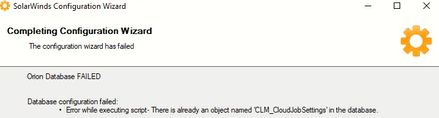
Orion Configuration Wizard Error while upgrading to version 2023.1: "Error while executing script- There is already an object named 'CLM_CloudJobSettings' in the database."
While upgrading from 2020.2.6 to 2023.1 configuration wizard throws Error while executing script- There is already an object named 'CLM_CloudJobSettings' in the database.
First published date
2/1/2023 3:40 PM
Last published date
2/7/2025 8:02 PM
Overview
While upgrading Solarwinds platform from 2020.2.6 to 2023.1/2023.2/2023.2.1 you may run into below error during configuration wizard
Error 1 (fixed in 2023.1):
===
Error 1 (fixed in 2023.1):
===
2023-02-01 11:29:02,857 [14] ERROR DBConfigProcessor - Error while executing script - Cannot insert the value NULL into column 'Id', table 'SWDB.dbo.CLM_CloudJobSettings'; column does not allow nulls. INSERT fails.
The statement has been terminated..
Error details: System.Data.SqlClient.SqlException (0x80131904): Cannot insert the value NULL into column 'Id', table 'SWDB.dbo.CLM_CloudJobSettings'; column does not allow nulls. INSERT fails.
Error 2 (see workaround below):
Error while executing script- There is already an object named 'CLM_CloudJobSettings' in the database.
Product section
Orion Platform
Cause
This issue is resolved in SolarWinds Platform 2023.4 and above.
Resolution
Workaround (Please backup your Solarwinds DB):
Using SQL Studio:1. Login to SQL Server hosting the SolarwindsOrion DB
2. Connect Open SQL management Studio and Locate the table "CLM_CloudJobSettings" under Solarwinds Orion DB and check if there is any data. You can safely delete this table if it is empty.
- If you get an error about constraints on the table, then delete the constraints first and then the table.
- Run below query to find the constraints names to which tables they reference.
SELECT 'ALTER TABLE ' + OBJECT_SCHEMA_NAME(k.parent_object_id) + '.[' + OBJECT_NAME(k.parent_object_id) + '] DROP CONSTRAINT ' + k.name FROM sys.foreign_keys k WHERE referenced_object_id = object_id('CLM_CloudJobSettings')
4. Re-run the configuration wizard.Using Orion DB Manager App on Solarwinds server:
1. Login to Solarwinds Server
2. Launch Database Manager app
3. Add Orion Server
4. Right click SolarwindsOrion DB > New Query
5. Run the Query
Select * from CLM_CloudJobSettings6. If it returns 0 rows, then we can delete the table without data loss as it will be re-created during configuration wizard.
- Before deleting the table, run below query to get the foreign key constraints on the table
SELECT 'ALTER TABLE ' + OBJECT_SCHEMA_NAME(k.parent_object_id) + '.[' + OBJECT_NAME(k.parent_object_id) + '] DROP CONSTRAINT ' + k.name FROM sys.foreign_keys k WHERE referenced_object_id = object_id('CLM_CloudJobSettings')
The output will be 1 or two rows, copy each row (query) and execute in Orion DB manager to delete the constraints.7. Run below query to delete the table
DROP TABLE CLM_CloudJobSettings8. Re-run configuration wizard