
Tools
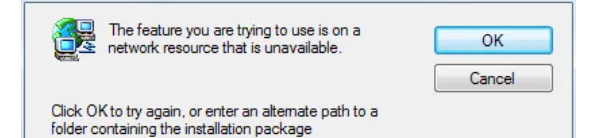
Error "The feature you are trying to use is on a network resource that is unavailable" when installing Dameware Mini Remote Control (MRC) agent
This article helps troubleshoot error "The feature you are trying to use is on a network resource that is unavailable' when installing Dameware
First published date
9/8/2022 12:02 AM
Last published date
9/19/2022 5:14 PM
Overview
The user may encounter the error below when installing Dameware Mini Remote Control Agent. It will ask for the location of the installer package.
Product section
Dameware Remote Support & Mini Remote Control
Cause
Not known.
Resolution
1. Open up the registry editor (Start --> Run --> regedit).
2. Navigate to the HKEY_LOCAL_MACHINE\SOFTWARE\Classes\Installer\Products.
3. Search for "Dameware," which should be a subbranch of the above directory.
Notes: It will look like "some random string "\SourceList\ which contains Media and Net.
4. Right-click on that random string and select Export to back it up if something breaks.
5. Right-click on that random string and select Delete.
6. Re-run the installer.
TO find out the exact subkey of the problematic program, click each subkeys one by one and double-click on the ProductName on the right side and see its value data. It should have the program name on it.
2. Navigate to the HKEY_LOCAL_MACHINE\SOFTWARE\Classes\Installer\Products.
3. Search for "Dameware," which should be a subbranch of the above directory.
Notes: It will look like "some random string "\SourceList\ which contains Media and Net.
4. Right-click on that random string and select Export to back it up if something breaks.
5. Right-click on that random string and select Delete.
6. Re-run the installer.
TO find out the exact subkey of the problematic program, click each subkeys one by one and double-click on the ProductName on the right side and see its value data. It should have the program name on it.