
Tools
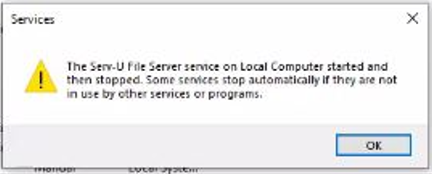
Error: The Serv-U File Server service on the Local Computer started and then stopped when starting the Serv-U service.
How to resolve an issue when Serv-U service won't start and get an "Error 1053 application did not respond to start or control request in a timely fashion"
First published date
9/16/2021 1:05 AM
Last published date
9/16/2021 1:05 AM
Overview
This applies to the following scenario.
- When starting the Serv-U from the system tray icon, nothing happens
- Even running from Service to Application, getting the same issue
- Re-installing the Serv-U application also does not help
- Serv-U can run when using the new Serv-U.Archive file
- When starting the service from the Windows Service, you would get an error below
Product section
Serv-U Managed File Transfer & Serv-U FTP Server
Cause
- Corrupted Serv-U.Archive file
- Security software installed on the Serv-U is blocking the service to run
Resolution
Please do any of the following:
- Restore Serv-U.Archive from a backup where Serv-U runs correctly, see Back up or move Serv-U Settings
- Reconfigure Serv-U from the scratch
- Make sure that Serv-U processes are not blocked by security applications or antivirus