
Tools
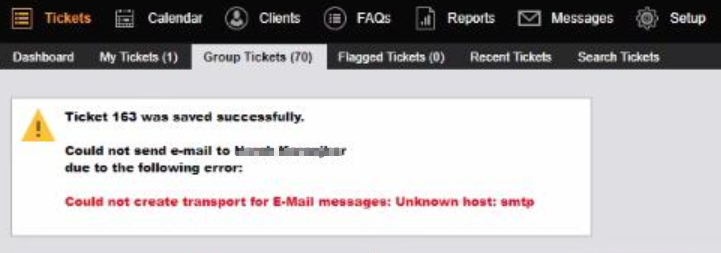
Error "Could not create transport for E-Mail messages: Unknown host: smtp" in Web Help Desk
In this article, it is provides the possible solution on how to address the issue when Incoming/Outgoing account is failing to process mail item.
First published date
11/14/2019 11:27 PM
Last published date
11/4/2022 5:48 PM
Overview
This article discusses how to rectify the error "could not create transport for E-Mail messages: Connection reset", "Could not create transport for E-Mail messages: Unknown host: smtp". This happens when the customer is doing save & email then it is failing to send mails.
Product section
Web Help Desk
Cause
Possible causes are:

- There is a blank entry in the WHD> Email> Outgoing Mail Accounts
- Network connectivity issue between webhelpdesk and email server
- Mail server fails to process email within the allowable time period (30 seconds)
- Too many mail messages are being sent at the same time causing a bottle-neck to the database connection
- The outgoing mail account field under the Incoming Mail Account is not pointing to the correct Outgoing Mail.
Resolution
Option 1:
If you see a blank entry in the Outgoing Mail Accounts, you need to delete it.
Option 2:
Make sure that the Outgoing Mail Account field under the Incoming Mail Account is pointing to the correct Outgoing Mail.
Option 3:
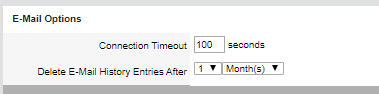
Change the connection timeout on Setup>Email>Options>Connection timeout to a value that is higher than the default (100-300 seconds)
Option 4:
Go to WebHelpDesk\conf\whd.conf and increase the DATABASE_CONNECTIONS value. Please take note that the value for the connections of the database that you're connected to should be double the amount of the value that you will set to the whd.conf file.
If you see a blank entry in the Outgoing Mail Accounts, you need to delete it.
- Since it's a blank account and you cannot click to delete it, open the first account:
- Click the > Next button, so you can go to the blank account, then click the DELETE button.
- Now, you will no longer see the blank entry account. Try to create a test ticket to confirm if it is working fine.
Option 2:
Make sure that the Outgoing Mail Account field under the Incoming Mail Account is pointing to the correct Outgoing Mail.
Option 3:
Change the connection timeout on Setup>Email>Options>Connection timeout to a value that is higher than the default (100-300 seconds)
Option 4:
Go to WebHelpDesk\conf\whd.conf and increase the DATABASE_CONNECTIONS value. Please take note that the value for the connections of the database that you're connected to should be double the amount of the value that you will set to the whd.conf file.