
Database Management
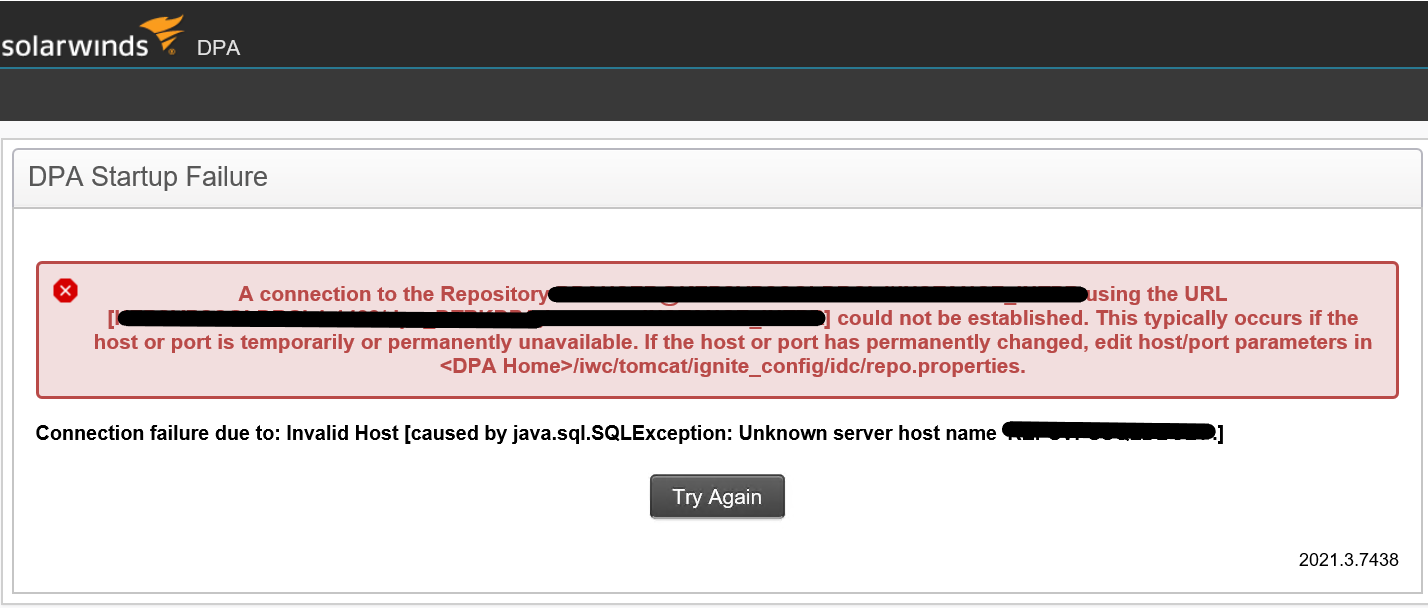
Error: A connection to the repository using the URL could not be established in DPA.
This article explains how to resolve the invalid host name error while starting the DPA.
First published date
11/25/2021 1:36 PM
Last published date
2/12/2025 12:37 AM
Overview
The error occurs typically if the Host where the DPA application is installed, or the port number is temporarily or permanently unavailable. Also, it occurs if the hostname is changed. While starting the DPA, the error can be observed stating that; Connection failure due to: Invalid Host [Caused by java.sql.SQLException: Unknown server host name: ' '.]
Product section
Database Performance Analyzer
Cause
This typically occurs if the hostname of the server where the DPA application is installed or the port is temporarily unavailable or changed.
Resolution
1: Check and confirm the new hostname of the server where the DPA application is installed.
2: Open the services and Stop the Ignite PI Server service in services.
3: Navigate to the following location on your DPA app server and open the file repo.properties as an Administrator.
Follow the path <DPA Home>/iwc/tomcat/ignite_config/idc/repo.properties.
4: Update the 'repo.host' and the 'repo.name' parameters. Also, check the repo.port if it is correct.
5: Save the file and Restart the Ignite PI Service in services.
Try to access the DPA console after trying the above steps to see if you are now able to access your DPA app.
2: Open the services and Stop the Ignite PI Server service in services.
3: Navigate to the following location on your DPA app server and open the file repo.properties as an Administrator.
Follow the path <DPA Home>/iwc/tomcat/ignite_config/idc/repo.properties.
4: Update the 'repo.host' and the 'repo.name' parameters. Also, check the repo.port if it is correct.
5: Save the file and Restart the Ignite PI Service in services.
Try to access the DPA console after trying the above steps to see if you are now able to access your DPA app.