
Tools
Enable the remote clipboard in Dameware Mini Remote Control
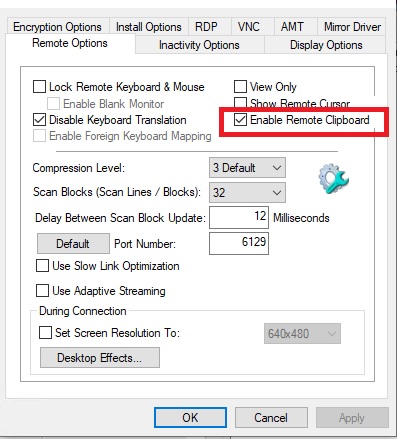
This article describes how to enable the remote clipboard option in Dameware Mini Remote Control that allows you to copy and paste a host to a target machine and vice versa.
First published date
10/7/2018 4:20 PM
Last published date
10/25/2019 4:22 PM
Overview
Enable Remote Clipboard allows a variety of data to be copied and pasted between a local machine and a remote machine.
Product section
Dameware Remote Support & Mini Remote Control
Resolution
1. Launch Dameware Mini Remote Control.
2. Click View > Settings > Remote Options.
3. Select Enable Remote Clipboard.
4. Click OK.
2. Click View > Settings > Remote Options.
3. Select Enable Remote Clipboard.
4. Click OK.