
Tools
Enable or Disable the use of Windows Hotkeys in Dameware MRC
This article shows how to enable or disable the use of Windows Hotkeys.
First published date
9/22/2020 11:42 PM
Last published date
9/22/2020 11:42 PM
Overview
Dameware MRC also supports using Windows Hotkeys to execute or control remote computers. It includes using CTRL, Windows key, and basic key combinations. When the use of Windows Hotkeys is active, all of the hotkeys done on the host keyboard will execute on the remote computer, and if this is disabled, it will execute on the host machine as it should normally.
Product section
Dameware Remote Support & Mini Remote Control
Resolution
1. Connect to the remote computer using Dameware MRC.
2. Click the View menu then select or deselect Use Windows Hot Keys.
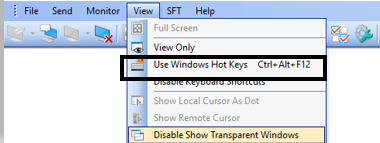
2. Click the View menu then select or deselect Use Windows Hot Keys.