
Security Compliance
Download or Copy SEM Syslog facility file(s) using WinSCP or FileZilla
This article shows steps on how to download/copy the syslog log files (local0,local1, etc.,) using WinSCP or FileZilla
First published date
1/19/2022 2:56 PM
Last published date
1/19/2022 2:56 PM
Overview
For the purpose of further troubleshooting by SolarWinds Technical support, sometimes you are required to download/copy and share the syslog log files (local0,local1, etc.,) from Security Events Manager (SEM) using WinSCP or FileZilla.
Product section
Security Event Manager
Cause
- Events are coming into SEM's local facilities but not showing in SEM Web Console
- Connectors not able to parse the received events.
- In case of a new connector request.
- Connectors not able to parse the received events.
- In case of a new connector request.
Resolution
1. Download and install WinSCP (© 2022 WinSCP.net, available at https://winscp.net/, obtained on January, 2022) or FileZilla (© 2022 FileZilla, available at https://filezilla-project.org/, obtained on January, 2022)
2. Connect to SEM's hostname or IP address via the SFTP protocol over port 22.
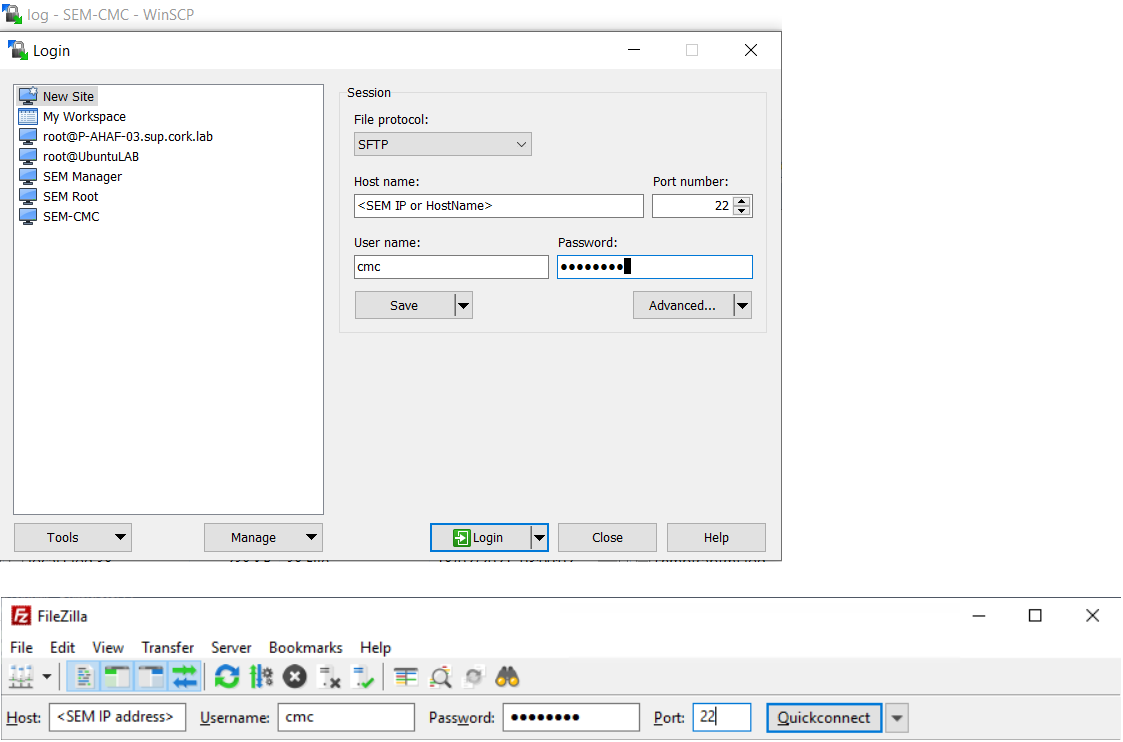
(Screenshots property of © 2022 FileZilla.com and WinSCP.net)
3. Use the cmc user credentials and log into the either of the above file sharing tools.
4. Zip* and share the file to SolarWinds Technical Support.
*If the file size is less than ~10 MB you can attach it to the case email else upload to the SFTP upload link you get once you create a new support case via the https://customerportal.solarwinds.com/
Disclaimer: Please note, any content posted herein is provided as a suggestion or recommendation to you for your internal use. This is not part of the SolarWinds software or documentation that you purchased from SolarWinds, and the information set forth herein may come from third parties. Your organization should internally review and assess to what extent, if any, such custom scripts or recommendations will be incorporated into your environment. You elect to use third party content at your own risk, and you will be solely responsible for the incorporation of the same, if any.
2. Connect to SEM's hostname or IP address via the SFTP protocol over port 22.
(Screenshots property of © 2022 FileZilla.com and WinSCP.net)
3. Use the cmc user credentials and log into the either of the above file sharing tools.
Default CMC credentials:

username: cmc and passowrd: password (*unless you have changed the password)
3. Once connected, go to /var/log and download the concerned remote facility file(s) on SEM to a local folder on your desktop.
4. Zip* and share the file to SolarWinds Technical Support.
*If the file size is less than ~10 MB you can attach it to the case email else upload to the SFTP upload link you get once you create a new support case via the https://customerportal.solarwinds.com/
Disclaimer: Please note, any content posted herein is provided as a suggestion or recommendation to you for your internal use. This is not part of the SolarWinds software or documentation that you purchased from SolarWinds, and the information set forth herein may come from third parties. Your organization should internally review and assess to what extent, if any, such custom scripts or recommendations will be incorporated into your environment. You elect to use third party content at your own risk, and you will be solely responsible for the incorporation of the same, if any.