
Network Management
Disable automatic subnet scan in IPAM
The article provides steps by step procedure on how to disabling Automatic Scanning by subnet and by bulk.
First published date
10/1/2020 11:23 PM
Last published date
8/18/2021 8:28 PM
Overview
Disabling Automatic Scanning subnets is a case to case basic, usually others disabling Automatic Scanning subnets because they are doing manual scan of the subents.
Product section
IP Address Manager
Resolution
Click My Dashboard > IP ADDRESSES >Manage Subnets & IP Addresses.
-Pick the subnets, click the EDIT.
-Look for Automatic Scanning.
-Check the checkbox for "Disable Automatic Scanning".
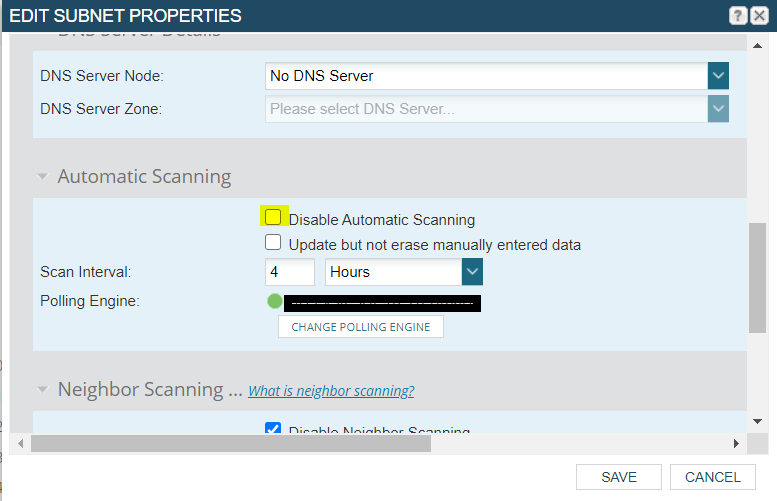
You can also do it by bulk, you just need to select multiple subnets and follow the same procedure.
-Pick the subnets, click the EDIT.
-Look for Automatic Scanning.
-Check the checkbox for "Disable Automatic Scanning".
You can also do it by bulk, you just need to select multiple subnets and follow the same procedure.