
Tools
Change or Disable Session Time out for Kiwi Syslog Web Access
This article helps on how to disable or change session time out setting for Kiwi Syslog Web Access.
First published date
3/8/2022 9:05 AM
Last published date
6/23/2023 9:01 AM
Overview
As Kiwi 9.8 and later (9.8.1) is integrated with Microsoft's IIS. You will notice that the Kiwi Web Access session gets time out after an idle time of 20 minutes (default). You can fix this issue by modifying the idle time out value.
- 0 = Unlimited
- <Other numbers> (minutes) = desired time out
Product section
Kiwi Syslog Server
Cause
In IIS manager, the default Idle Time-out (minutes) set to 20 for the KiwiAppPool
Resolution
Scenario 1: Disabling Session Time out
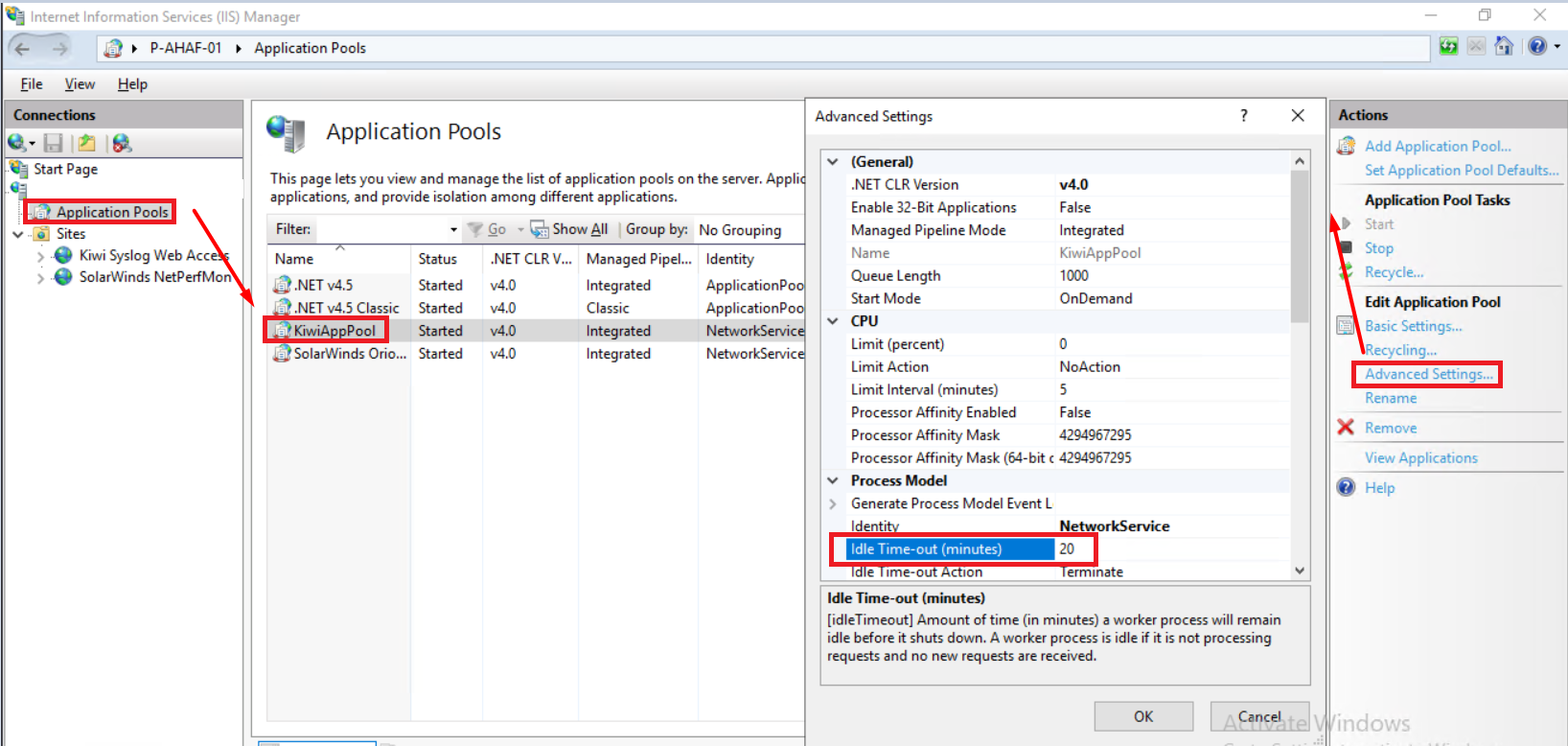
(Screenshots property of © 2022 Microsoft)
Scenario 2: Modifying or changing session time out to a desired value.
- Open IIS Manager ("inetmgr" from Run prompt) where Kiwi Web Access is installed.
- Select "Application Pools"
- Select KiwiAppPool
- Click Advanced Settings on the right
- Under "Process Model" set "Idle Time-out (minutes) from 20 to 0
- Note: As the default page refresh rate is 120 seconds, technically Kiwi Web Access will not timeout the session in most cases.
- Then "Recycle", "Stop" and "Start" the selected app pool
- Perform iisreset via command prompt.
- Login to Kiwi Web Access and monitor (Expected behavior is that the session should not timeout).
(Screenshots property of © 2022 Microsoft)
Scenario 2: Modifying or changing session time out to a desired value.
- Login to Kiwi Web Access in google chrome
- Go to Settings Tab and In Page refresh rate set to 240 Sec
- Open IIS Manager > Select "Application Pools"
- Select KiwiAppPool
- Click Advanced Settings on the right
- Under "Process Model" set "Idle Time-out (minutes)" from default 20 (minutes) to 3 or desired value
- From Application Pool Task click stop, start and recycle
- Restart IIS and refresh the Kiwi web access
- Login to Kiwi Web Access and left open for some time
- Kiwi Web Access Session will be timed out.