
Tools
Deploying the agent service through DRS
Instructions to mass deploy Mini Remote Control's service and Dameware Remote Support service (DNTU26S) through the Dameware Remote Support Services view.
First published date
10/29/2018 3:39 PM
Last published date
5/14/2020 8:45 PM
Overview
This article provides instructions for mass deployment of the Mini Remote Control's service and Dameware Remote Support service (DNTU26S) through the Dameware Remote Support Services view.
Product section
Dameware Remote Support & Mini Remote Control
Resolution
1. Run DameWare with Administrator rights.
2. Select any machine from the browser pane and expand it.
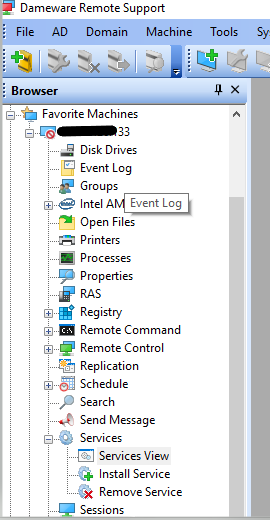
3. Select Services View.
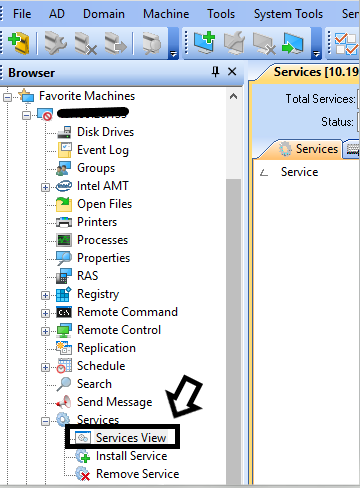
NOTE: After Services view has been selected, Service displays in the menu.
4. Add target machines to the Batch view pane.
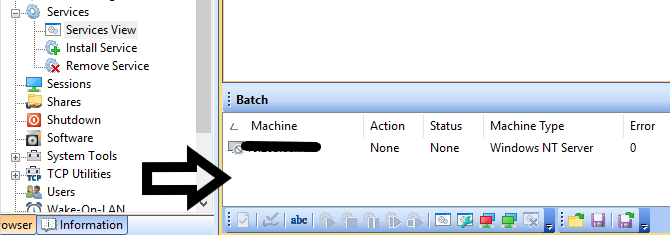
NOTE: You can drag one machine at a time from the browser into Batch, or you can add an entire Active Directory site by dragging it into Batch.
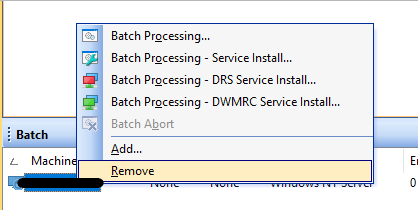
5. Highlight all of the target machines and select which service to install.
NOTE:
Click Batch Processing - DRS Service Install (DRS service)
Click Batch Processing - DWMRC Service Install (Dameware Mini Remote Control Agent service)
2. Select any machine from the browser pane and expand it.
3. Select Services View.
NOTE: After Services view has been selected, Service displays in the menu.
4. Add target machines to the Batch view pane.
NOTE: You can drag one machine at a time from the browser into Batch, or you can add an entire Active Directory site by dragging it into Batch.
5. Highlight all of the target machines and select which service to install.
NOTE:
Click Batch Processing - DRS Service Install (DRS service)
Click Batch Processing - DWMRC Service Install (Dameware Mini Remote Control Agent service)