
Tools
The license activation wizard is not showing when activating Dameware
This article shows how to resolve when the license activation wizard is not showing up.
First published date
4/24/2019 8:51 PM
Last published date
5/4/2026 3:30 PM
Overview
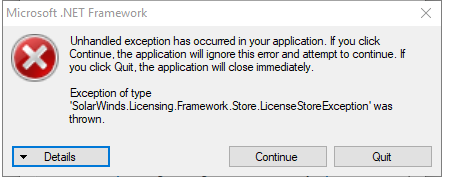
When a customer tries to activate Dameware Remote Support (DRS) or Mini Remote Control (MRC) after installing it, the license activation wizard is not showing up, it seems nothing happens even running as administrator. In some cases, if you use Solarwinds license manager, you may get the following error related to .NET framework exception error.
Product section
Dameware Remote Support & Mini Remote Control
Cause
Not known.
Resolution
- Run the license reset tool from this link.
- Password is (without double quotes): “burn/purify”
- Run it on the affected machine.
- Run activation again.