
Tools
Dameware Toolbar and Main Menu Appears but Grayed Out and Unusable in the version 12.3.0
This article describes the Dameware Mini Remote Control issue in which a certain Toolbar appears but is not usable and looks corrupted.
First published date
8/15/2023 3:51 PM
Last published date
1/17/2025 10:39 PM
Overview
The Dameware 12.3.0 uses an upgraded Toolbar compared to previous versions.
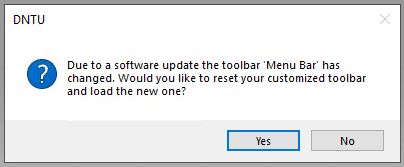
For users who upgraded 12.3.0 or previously installed Dameware, they will be asked to accept an update on the Toolbar after the upgrade/installation has been completed.
For instances in which users do not get this prompt, they might see a different menu from 12.3.0 and notice that all Dameware Main Menu are Grayed out.
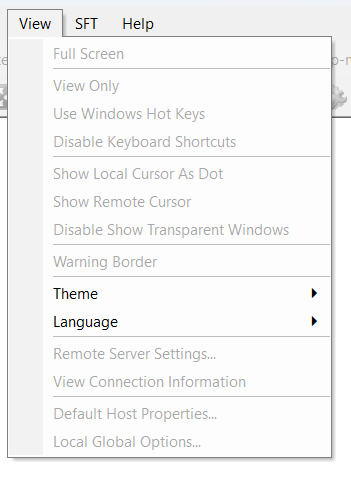
There are also instances in which Main Menu is working but there are text toolbars that are grayed out appearing on the Dameware Toolbar.
These text toolbars are from 12.2.3 and below.

For users who upgraded 12.3.0 or previously installed Dameware, they will be asked to accept an update on the Toolbar after the upgrade/installation has been completed.
For instances in which users do not get this prompt, they might see a different menu from 12.3.0 and notice that all Dameware Main Menu are Grayed out.
There are also instances in which Main Menu is working but there are text toolbars that are grayed out appearing on the Dameware Toolbar.
These text toolbars are from 12.2.3 and below.
Product section
Dameware Remote Support & Mini Remote Control
Cause
The removal of the version 12.2.3 and below Toolbar were not removed.
Resolution
- Option 1
- Reset the Toolbar from this menu:
- Option 2
- Close all open DMRC
- Delete the file called Bars_Main located in C:\Users\current_username\AppData\Roaming\DWRCC
- Relaunch DMRC
- Option 3
- Close all open DMRC
- Open Registry Editor
- Go to: Computer\HKEY_CURRENT_USER\SOFTWARE\DameWare Development\Mini Remote Control
- Remove the Bars folder
- Relaunch Dameware