
Tools
Dameware Remote Support (DRS) Network Browser Pane is missing
The Network Browser Pane was gone from the left side of DRS where the Active Directory information is.
First published date
9/29/2021 5:37 PM
Last published date
6/17/2022 11:23 PM
Overview
When you open the Dameware Remote Support (DRS) tool, there is normally a browser pane on the left-hand side that has Active Directory, Microsoft Windows Network, Favorite Domains and Favorite Machines.
If it is missing, please see the instructions below:
If it is missing, please see the instructions below:
Product section
Dameware Remote Support & Mini Remote Control
Cause
Usually happens when it is closed by mistake
Resolution
*Note: You may need to adjust the resolution of your computer if scroll bars are in the way of the functionality of the menu.
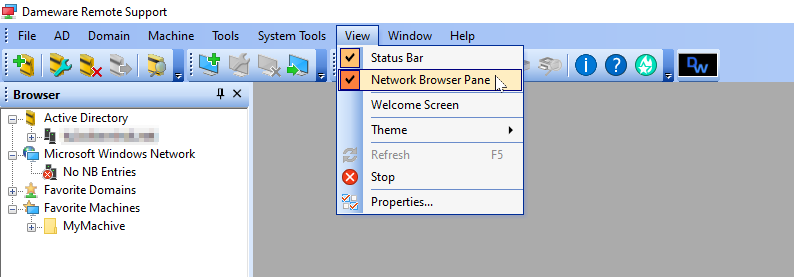
- In DRS click on the "View" drop down menu
- Click on "Network Browser Pane"