
Network Management
Custom table "The resource doesn't show all data" in NPM
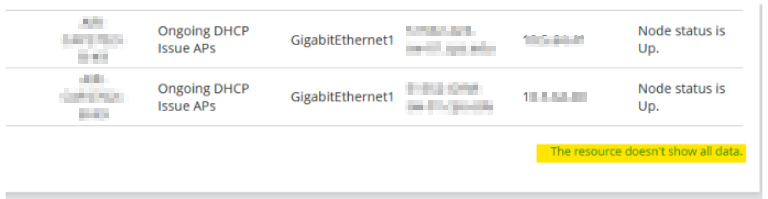
Customer is getting the message "The resource doesn't show all data" from a custom table. Some of the data is missing or not available.
First published date
7/5/2022 10:20 PM
Last published date
7/26/2022 9:39 AM
Overview
This article is related to the custom table issue on which the customer is getting the message "The resource doesn't show all data" and will not show all the data. This issue may occur on a custom table widget or from a custom report.
Product section
Network Performance Monitor
Cause
This is related to the ReportingTableViewMaxRowCount table in the database which by default will on shows a value of 100.
Resolution
1) Make a backup of your current Orion database
2) On the Orion server, open up Database Manager from the Start Menu
3) Click the Add default server button, then browse to your Orion database
4) Expand your database, and scroll down to the WebSettings table
5) Double-click the WebSettings table, then click Execute Query
6) Scroll down to find the entry for ReportingTableViewMaxRowCount
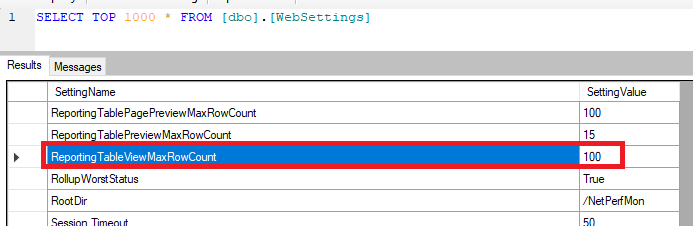
7) Click to Enable Table Editing, then change the value from 100 to your desired value.
Note: It is recommended to increase that value in small amounts to avoid crashing your web console, and to a value that is only as high as it needs to be.
2) On the Orion server, open up Database Manager from the Start Menu
3) Click the Add default server button, then browse to your Orion database
4) Expand your database, and scroll down to the WebSettings table
5) Double-click the WebSettings table, then click Execute Query
6) Scroll down to find the entry for ReportingTableViewMaxRowCount
7) Click to Enable Table Editing, then change the value from 100 to your desired value.
Note: It is recommended to increase that value in small amounts to avoid crashing your web console, and to a value that is only as high as it needs to be.