
Network Management
Custom query to find muted nodes or interfaces
This article provides steps on how to create a resource to show a list of nodes or interfaces that are currently muted.
First published date
10/29/2018 3:52 PM
Last published date
7/23/2023 2:19 PM
Overview
This article provides information on how to create a custom query widget to find and display list of nodes or interfaces that are currently muted in your SolarWinds environment.
Note, you need to add two Custom Query widgets one for nodes and another for interfaces.
Note, you need to add two Custom Query widgets one for nodes and another for interfaces.
Product section
Network Performance Monitor
Resolution
1. In SolarWinds web console, Go to the view/dashboard to customize.
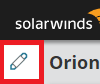
2. Click the pencil icon on the upper left.
3. Click the Add Widgets button on the upper right and search for "Custom Query" and press enter.
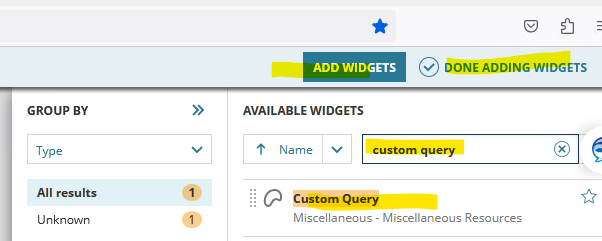
4. Select the "Custom Query" widget from results and click Add (drag and drop to left)
5. Click Done Editing on top right
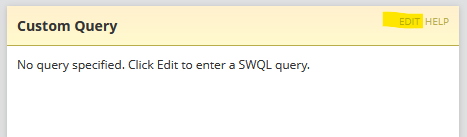
6. New "Customer Query" widget will be visible on the Dashboard / view, Click Edit
7. It will look like this, copy and past the One of the below query and click submit. Note: Only One query per widget.
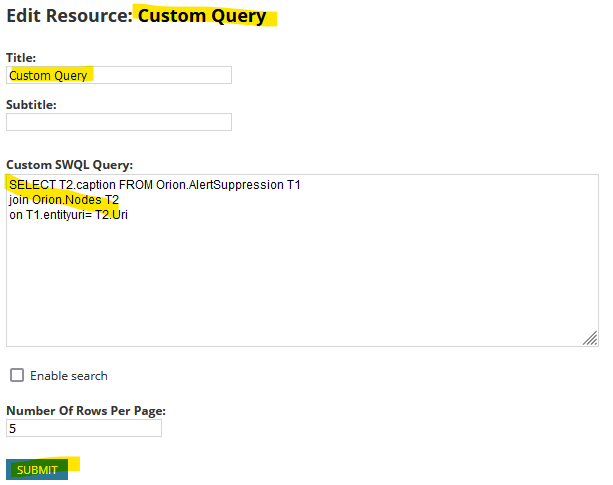
If you like to add another widget for interfaces, repeat the above steps and add the Interfaces Query (second query below)
/* SWQL query to find muted Node Names*/
/* SWQL query to find muted Interface Names*/
2. Click the pencil icon on the upper left.
3. Click the Add Widgets button on the upper right and search for "Custom Query" and press enter.
4. Select the "Custom Query" widget from results and click Add (drag and drop to left)
5. Click Done Editing on top right
6. New "Customer Query" widget will be visible on the Dashboard / view, Click Edit
7. It will look like this, copy and past the One of the below query and click submit. Note: Only One query per widget.
If you like to add another widget for interfaces, repeat the above steps and add the Interfaces Query (second query below)
/* SWQL query to find muted Node Names*/
-- Scripts are not supported under any SolarWinds support program or service.
-- Scripts are provided AS IS without warranty of any kind. SolarWinds further
-- disclaims all warranties including, without limitation, any implied warranties
-- of merchantability or of fitness for a particular purpose. The risk arising
-- out of the use or performance of the scripts and documentation stays with you.
-- In no event shall SolarWinds or anyone else involved in the creation,
-- production, or delivery of the scripts be liable for any damages whatsoever
-- (including, without limitation, damages for loss of business profits, business
-- interruption, loss of business information, or other pecuniary loss) arising
-- out of the use of or inability to use the scripts or documentation.

SELECT T2.caption FROM Orion.AlertSuppression T1
join Orion.Nodes T2
on T1.entityuri= T2.Uri
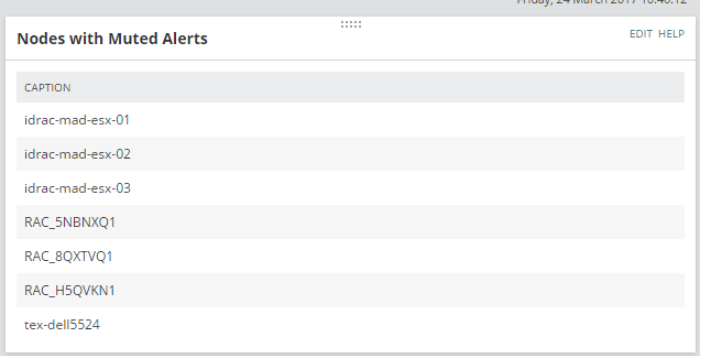
The end Result will look something like below:
/* SWQL query to find muted Interface Names*/
-- Scripts are not supported under any SolarWinds support program or service.
-- Scripts are provided AS IS without warranty of any kind. SolarWinds further
-- disclaims all warranties including, without limitation, any implied warranties
-- of merchantability or of fitness for a particular purpose. The risk arising
-- out of the use or performance of the scripts and documentation stays with you.
-- In no event shall SolarWinds or anyone else involved in the creation,
-- production, or delivery of the scripts be liable for any damages whatsoever
-- (including, without limitation, damages for loss of business profits, business
-- interruption, loss of business information, or other pecuniary loss) arising
-- out of the use of or inability to use the scripts or documentation.

SELECT T2.caption FROM Orion.AlertSuppression T1
join Orion.NPM.Interfaces T2
on T1.entityuri= T2.Uri
The end Result will look something like below: