
Network Management
Custom SQL reports fail after the upgrade to 2023.2 (Error executing SQL: database 'SolarWindsOrion')
Custom SQL reports in the SolarWinds Web Console fail with an error "The SELECT permission was denied on the object". This occurs both when running the report manually and when executed on a schedule.
First published date
6/26/2023 11:05 AM
Last published date
2/10/2025 8:36 PM
Overview
In SolarWinds Platform 2023.2, SQL reports were adjusted to use a dedicated user (ReportingClient) and dedicated role (Reporting). The new user is not permitted to change data in the database, read sensitive data, or access other databases on the server. As a result, if your reports required querying a table with sensitive data, such as the Accounts table, they might stop working. This article shows how to extend the permissions within the SolarWinds Platform database. Other databases, such as Flow Storage, Log Analyzer Database, or other databases remain unreachable.
If you have issues with accessing the Flow Storage, the Log Analyzer Database, or any other database, see Custom SQL reports fail after the upgrade to 2023.2 (Error executing SQL: not able to access the database 'SolarWindsOrionLog', 'FlowStorage', or a custom database.
The report with issues will fail with a similar error:
If you have issues with accessing the Flow Storage, the Log Analyzer Database, or any other database, see Custom SQL reports fail after the upgrade to 2023.2 (Error executing SQL: not able to access the database 'SolarWindsOrionLog', 'FlowStorage', or a custom database.
The report with issues will fail with a similar error:
Report resource failed to properly initialize.

Error setting up report cell during rendering 'Custom Table.'
Error executing SQL: The SELECT permission was denied on the object 'Accounts', database 'SolarWindsOrion', schema 'dbo'. <br>Query: <br>select * from accounts
ERROR SolarWinds.InformationService.Core.InformationService - (null) (null)    Exception caught in method SolarWinds.InformationService.Core.InformationService.Invoke
SolarWinds.Data.Providers.Orion.Common.VerbException: Error executing SQL: The SELECT permission was denied on the object 'Accounts', database '<DatabaseName>', schema 'dbo'. ---> System.Data.SqlClient.SqlException: The SELECT permission was denied on the object 'Accounts', database '<DatabaseName>', schema 'dbo'.
In the OrionWeb.log, you will find similar details:
ERROR SolarWinds.Orion.Core.Reporting.DataTableQueryBase - (null)  Errored query dataSource: Datasource 1/e5bb635d-f94c-4448-a853-a8f00f9ebe48 Query:Command:select * from accounts
Parameters:
System.ServiceModel.FaultException`1[SolarWinds.InformationService.Contract2.InfoServiceFaultContract]: Orion.Reporting.ExecuteSQL failed, check fault information.
Error executing SQL: The SELECT permission was denied on the object 'Accounts', database 'SolarWindsOrion', schema 'dbo'. (Fault Detail is equal to InfoServiceFaultContract, ErrorCode=00000032, UserMessage='Error executing SQL' [ SolarWinds.Data.Providers.Orion.Common.VerbException: Error executing SQL: The SELECT permission was denied on the object 'Accounts', database 'SolarWindsOrion', schema 'dbo'. ---> System.Data.SqlClient.SqlException: The SELECT permission was denied on the object 'Accounts', database 'SolarWindsOrion', schema 'dbo'.
   at System.Data.SqlClient.SqlConnection.OnError(SqlException exception, Boolean breakConnection, Action`1 wrapCloseInAction)
   at System.Data.SqlClient.TdsParser.ThrowExceptionAndWarning(TdsParserStateObject stateObj, Boolean callerHasConnectionLock, Boolean asyncClose)
   at System.Data.SqlClient.TdsParser.TryRun(RunBehavior runBehavior, SqlCommand cmdHandler, SqlDataReader dataStream, BulkCopySimpleResultSet bulkCopyHandler, TdsParserStateObject stateObj, Boolean& dataReady)
   at System.Data.SqlClient.SqlDataReader.TryConsumeMetaData()
   at System.Data.SqlClient.SqlDataReader.get_MetaData()
   at Syst...).
ERROR SolarWinds.Orion.Web.Reporting.ReportPreviewControl - (null)  Error setting up report cell during rendering 'Custom Table.'
SolarWinds.Orion.Core.Reporting.Exceptions.ExecutionFailedException: Error executing SQL: The SELECT permission was denied on the object 'Accounts', database 'SolarWindsOrion', schema 'dbo'.
Query:
select * from accounts
   at SolarWinds.Orion.Core.Reporting.FieldProviderCustomSQL.GetFields()
   at SolarWinds.Orion.Core.Reporting.FieldProviderCustomSQL.TryGetField(FieldRef fieldRef, Field& field)
   at SolarWinds.Orion.Core.Reporting.FieldProviderCustomSQL.GetField(String fieldRefID)
   at SolarWinds.Orion.Core.Reporting.DataTableQueryBase.GetMetaData(String qualifiedPropertyName)
   at SolarWinds.Reporting.Impl.Tables.DataTableRequester.<DoQuery>b__21_0(TableColumn n)
   at System.Linq.Enumerable.WhereSelectArrayIterator`2.MoveNext()
   at System.Linq.Enumerable.<ConcatIterator>d__59`1.MoveNext()
   at System.Linq.Buffer`1..ctor(IEnumerable`1 source)
   at System.Linq.Enumerable.ToArray[TSource](IEnumerable`1 source)
   at SolarWinds.Reporting.Impl.Tables.DataTableRequester.DoQuery()
   at SolarWinds.Reporting.Impl.Tables.DataTablePresenterProcessor.PrepareForRendering(DataTableRequester requester)
   at SolarWinds.Reporting.Impl.Rendering.TableRenderer.Render(IRenderCellContext host, TextWriter control)
   at SolarWinds.Orion.Web.Reporting.ReportCellWrapper.<>c__DisplayClass9_0.<Render>b__1()
   at SolarWinds.Orion.Web.Reporting.ReportCellWrapper.WithinExceptionCatcher(Func`1 errorMessage, Action fnCode)
Product section
Orion Platform
Cause
From 2023.2.X to 2023.3.X, a dedicated database user (ReportingClient) was added for SQL queries that require accessing sensitive data outside the SolarWindsOrion database (i.e. NetFlow, Log Analyzer or any other custom database). This change was made for security reasons.
Resolution
If SQL report query requires accessing a database table outside the standard SolarWindsOrion database, grant the ReportingClient read permissions.
The report will now be executed correctly. If the table used by the custom SQL in the report is on a different database, such as Flow Storage, Log Analyzer Database, or another custom database, See KB NR2.
Alternatively, you can also use the SolarWinds Database Manager and grant the privileges by running the following SQL Query.
In the code, replace Accounts with the name of the table you need the SQL report to access.
For customer running 2023.2.X to 2023.3.X:
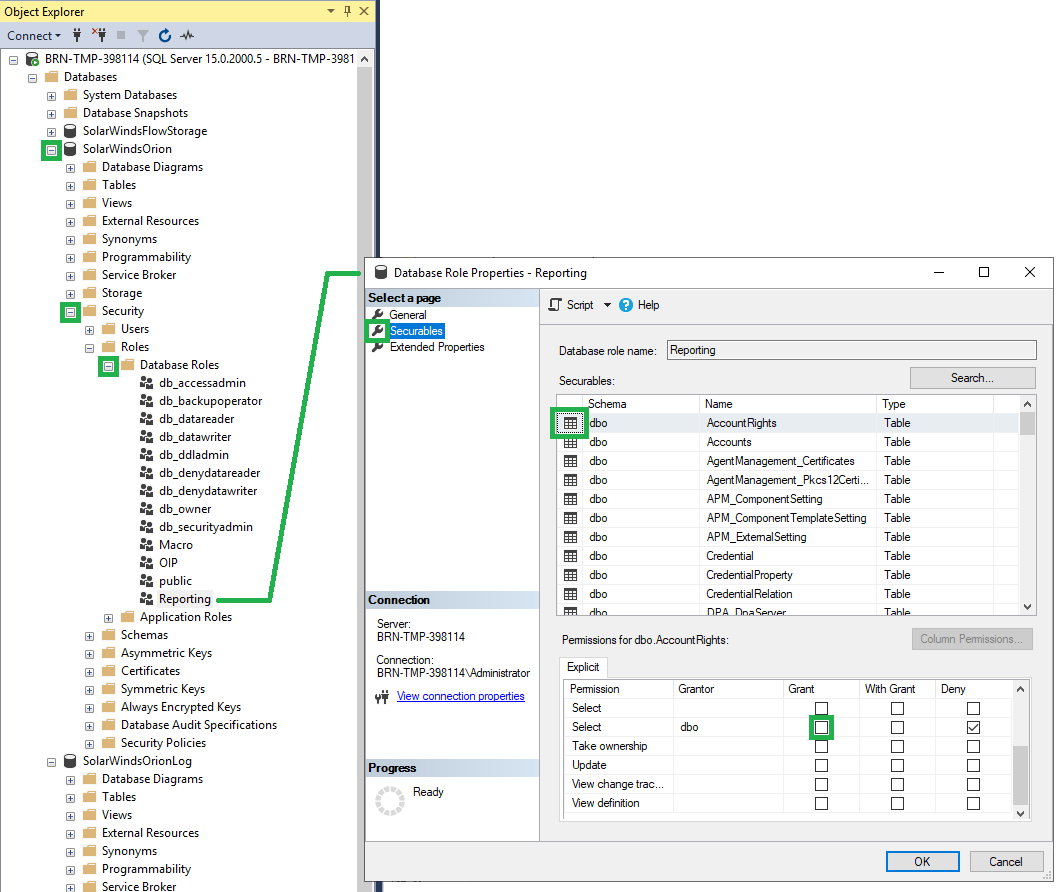
- Using MS SQL Studio, log in to your database server as an administrator.
- Navigate to SolarWindsOrion > Security > Roles > Database Roles > Reporting.
- Right-click the Reporting role
- Select Properties
- In the popup window, click Securables, and then select the table you want to access. For example, the picture below shows how to select the AccountRights table.
- In the Permissions for dbo.<table name> are, select the the box in the Grant column
- Click OK.
The report will now be executed correctly. If the table used by the custom SQL in the report is on a different database, such as Flow Storage, Log Analyzer Database, or another custom database, See KB NR2.
Alternatively, you can also use the SolarWinds Database Manager and grant the privileges by running the following SQL Query.
In the code, replace Accounts with the name of the table you need the SQL report to access.
GRANT SELECT ON [dbo].[Accounts] TO [Reporting]
For customer running 2023.4.X and above:
To resolve this issue, use the Database Manager or the Server Management Studio to edit the WebSettings table in the SolarWinds Platform database. Change the value of ReportingSQLReportsUseDBServerLevelLogin to true.
When ReportingSQLReportsUseDBServerLevelLogin is set to true, the database account that was specified in the Configuration Wizard is used to query the database. By default, this is SolarWindsOrionDatabaseUser.