
Network Management
Creating new windows account the Active Directory user lookup fails and returns no data in Orion Platform
This article shows how to resolve an issue in creating new windows account where the Active Directory user lookup fails and returns no data.
First published date
6/16/2021 8:12 PM
Last published date
2/11/2025 7:23 PM
Overview
In adding a New Windows Account, the Active Directory lookup fails and returns no data without any error/s. As similarly shown below:
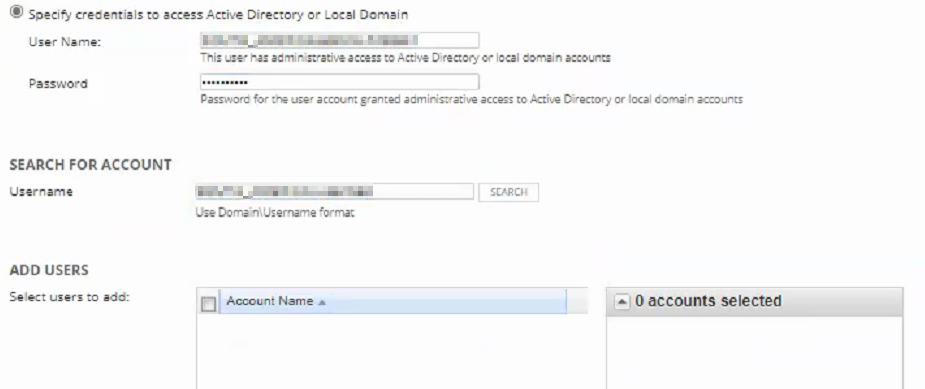
Checking the OrionWeb.log (C:\ProgramData\SolarWinds\Logs\Orion) seeing WARN log below:
WARN SolarWinds.Orion.Web.AccountSearchHelper - (null) Couldn't get Netbios domain name!
System.DirectoryServices.Protocols.DirectoryOperationException: The object does not exist.
at System.DirectoryServices.Protocols.LdapConnection.ConstructResponse(Int32 messageId, LdapOperation operation, ResultAll resultType, TimeSpan requestTimeOut, Boolean exceptionOnTimeOut)
at System.DirectoryServices.Protocols.LdapConnection.SendRequest(DirectoryRequest request, TimeSpan requestTimeout)
at System.DirectoryServices.Protocols.LdapConnection.SendRequest(DirectoryRequest request)
at SolarWinds.Orion.Web.LdapAuthentication.GetNetbiosDomainName()
at SolarWinds.Orion.Web.AccountSearchHelper.SearchUsingAuthenticatedLDAP(String user, String password, String domain, String patternToSearch, String sortDirection, Boolean isGroupSearch)
Checking the OrionWeb.log (C:\ProgramData\SolarWinds\Logs\Orion) seeing WARN log below:
WARN SolarWinds.Orion.Web.AccountSearchHelper - (null) Couldn't get Netbios domain name!
System.DirectoryServices.Protocols.DirectoryOperationException: The object does not exist.
at System.DirectoryServices.Protocols.LdapConnection.ConstructResponse(Int32 messageId, LdapOperation operation, ResultAll resultType, TimeSpan requestTimeOut, Boolean exceptionOnTimeOut)
at System.DirectoryServices.Protocols.LdapConnection.SendRequest(DirectoryRequest request, TimeSpan requestTimeout)
at System.DirectoryServices.Protocols.LdapConnection.SendRequest(DirectoryRequest request)
at SolarWinds.Orion.Web.LdapAuthentication.GetNetbiosDomainName()
at SolarWinds.Orion.Web.AccountSearchHelper.SearchUsingAuthenticatedLDAP(String user, String password, String domain, String patternToSearch, String sortDirection, Boolean isGroupSearch)
Product section
Network Performance Monitor
Cause
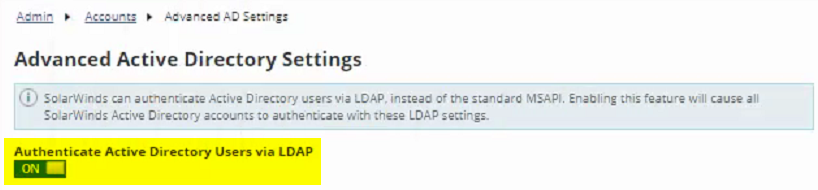
- The Advanced Active Directory Settings - Authenticate Active Directory Users via LDAP is currently enabled.
Resolution
Workaround 1:
- OR -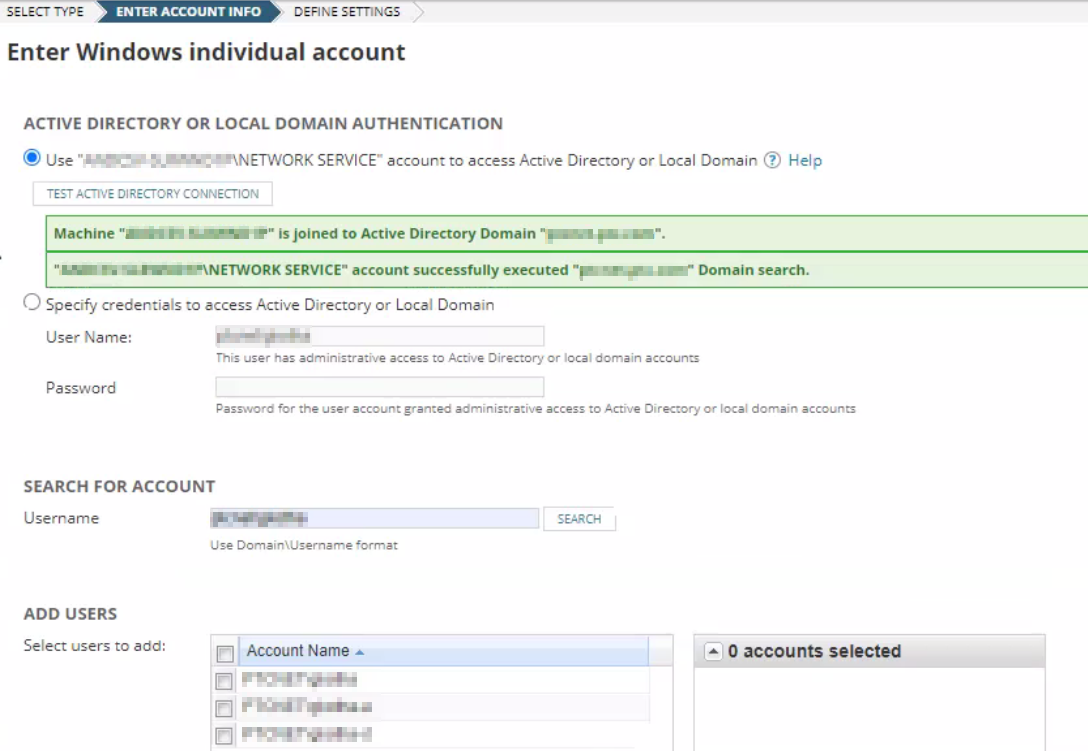
- Go to SETTINGS > All Settings > USER ACCOUNTS > Advanced AD Settings
- Toggle OFF the Authenticate Active Directory Users via LDAP and click on the SAVE button for changes to take effect.
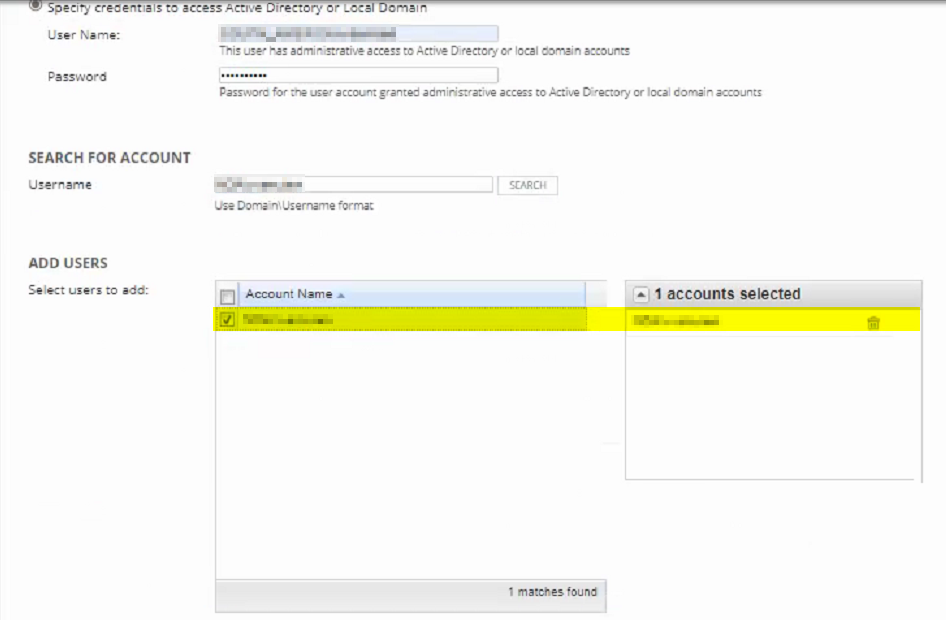
- Try again to Add New Windows Account, the Active Directory user should now be able to look up and return data.
- OR -
- If Specify credentials to access the Active Directory or Local Admin still not returning data, it means that the User Name doesn't have administrative access to Active Directory or local domain accounts
- Select the Use "ORIONSERVER\NETWORK SERVICE" account to access Active Directory or Local Domain
- Click on the TEST ACTIVE DIRECTORY CONNECTION once successful should now be able to proceed with SEARCH FOR ACCOUNT