
Tools
Creating an Upload Folder in Serv-U
Using the Dir Access rules in Serv-U you can create one specific folder for your users to upload to.
First published date
7/24/2019 3:57 PM
Last published date
7/24/2019 3:57 PM
Overview
Using the Dir Access rules in Serv-U you can create one specific folder for your users to upload to. One important thing to remember when setting this up is that the Dir Access rules in Serv-U are applied in a top down fashion.
Product section
Serv-U Managed File Transfer & Serv-U FTP Server
Resolution
To setup a specific upload folder in Serv-U:
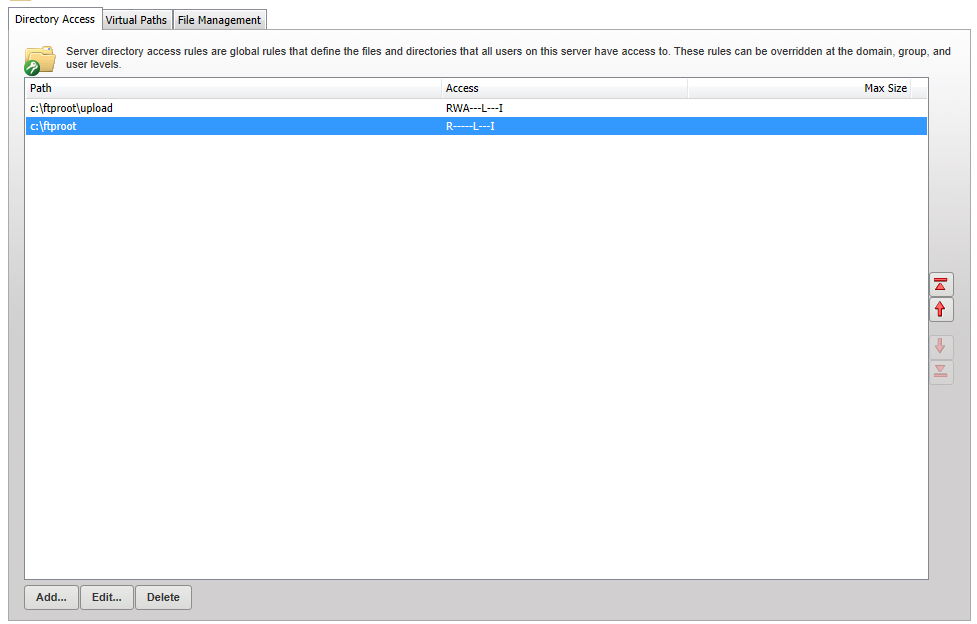
- Navigate to the Directory Access level you wish to edit (Server, Domain, Group, or User)
- Create a new Directory Access rule which grants Write/Append access to the specific folder that upload access should be granted to
- Save the rule, then move it above the first directory access rule