
Network Management
Create custom poller alert in the SolarWinds Platform
This article describes how you can alert on values polled by a custom Universal Device Poller (UnDP). Learn more about creating alerts and about UnDPs in SolarWinds Modules.
First published date
10/11/2018 11:26 AM
Last published date
9/8/2025 4:34 PM
Overview
This article describes how you can alert on values polled by a custom poller. Steps are given to create a custom alert based on data from a Universal Device Poller (UnDP).
Product section
Network Performance Monitor
Resolution
Note: See Alert on a printer toner level running low in the online help to find out how to create a custom poller alert for a specific scenario.


Note: Custom Node Poller\Current Numeric Value trigger condition works best for transformed poller statistics
- Navigate to the Alert Manager , and click Add New Alert.
- Enter the alert properties , which includes who can view the alert, severity, and how frequently the alert conditions are evaluated.
- Define the conditions must exist to trigger the alert :
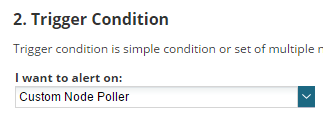
- Under I want to alert on, select Custom Node Poller or Custom Table Poller, depending on the type of poller you want to alert on.
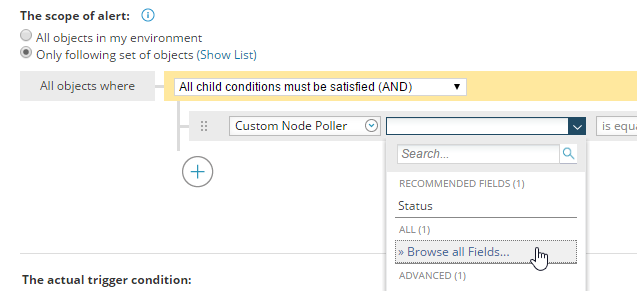
- Select Only the following set of objects.
- In Select Field ..., select Browse all Fields.
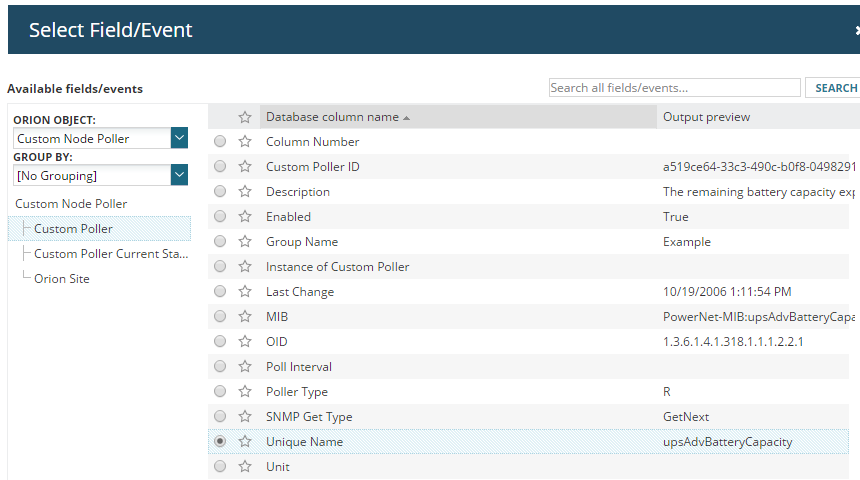
- Click Custom Poller on the right, select Unique Name, and click Select.
- Provide the UnDP name.
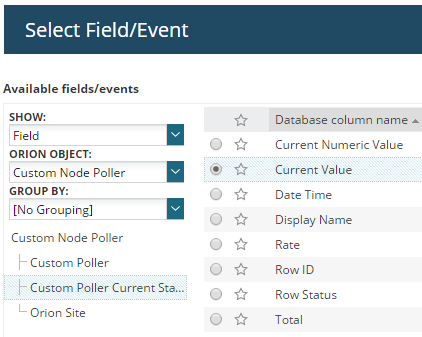
- The actual trigger condition section, click Select Field ... and select Browse all Fields.
- Select Custom Poller Current Status on the left, and select Current Numeric Value or Current Value, depending on if the value you are alerting on is a number or not.
- Enter the relationship and the value.
- Follow the wizard and finish the rest of the alert. See Create alerts to monitor your environment.
Once you have created an alert, it is added to the list of available alerts in the Alert Manager. When the alert is enabled, it immediately monitors your environment for the conditions necessary to trigger it.
Note: To include the triggered value to your email add the Current Value variable:
Additional resources
- Create custom monitors
- Alert on printer toner running low based on a custom UnDP (user scenario)
- Create Custom TABLE poller Alert
-
Create advanced alerts video (4:52):
Note: Custom Node Poller\Current Numeric Value trigger condition works best for transformed poller statistics