
Network Management
Create Report for Current IPAM License Count.
The article will show you how to create the Current IPAM License Count using Advance Database Query.
First published date
2/7/2020 6:00 PM
Last published date
2/7/2020 6:00 PM
Overview
Report will show the Current IPAM License Count.
Product section
IP Address Manager
Resolution
1. Click CREATE REPORT.
2. Pick Custom Table.
3. Choose Advance Database Query (SQL,SWQL) on Selection method:
4. Click The Radio button for "SQL".
5. Add the below query.
6. Click Preview Result.
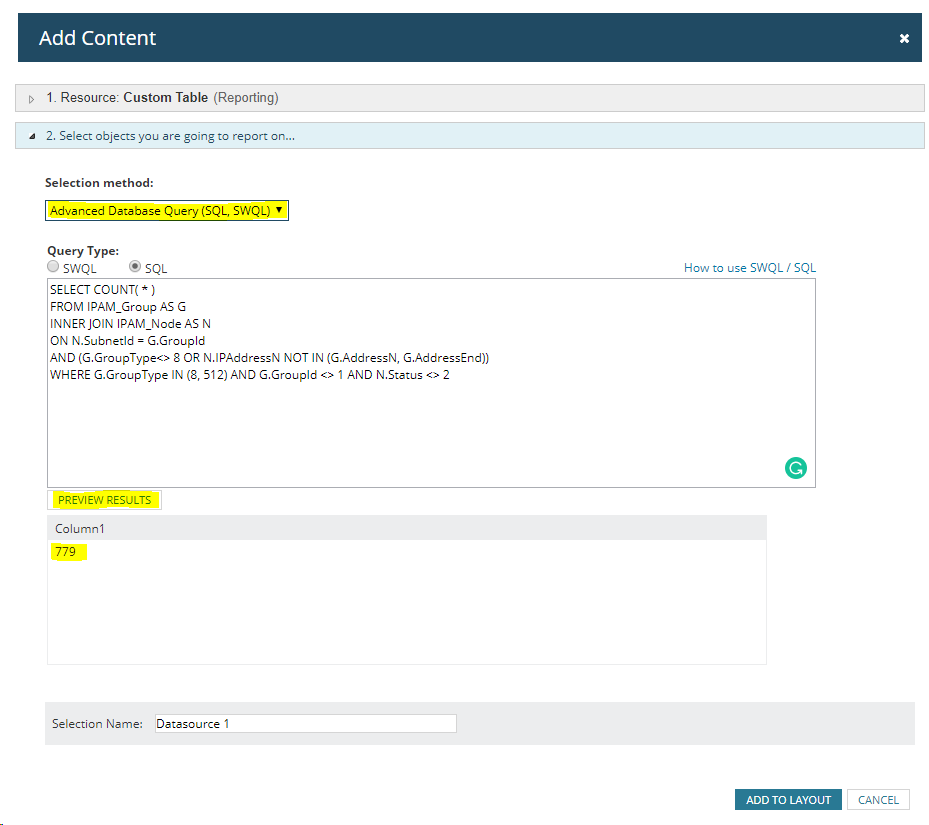
7. Click Add to layout.
8. Click Add Column, click the check box for Column1 then click Add Column.
9. Click Advance and change the Display Name:
10. Submit.
2. Pick Custom Table.
3. Choose Advance Database Query (SQL,SWQL) on Selection method:
4. Click The Radio button for "SQL".
5. Add the below query.
-- Scripts are not supported under any SolarWinds support program or service.
-- Scripts are provided AS IS without warranty of any kind. SolarWinds further
-- disclaims all warranties including, without limitation, any implied warranties
-- of merchantability or of fitness for a particular purpose. The risk arising
-- out of the use or performance of the scripts and documentation stays with you.
-- In no event shall SolarWinds or anyone else involved in the creation,
-- production, or delivery of the scripts be liable for any damages whatsoever
-- (including, without limitation, damages for loss of business profits, business
-- interruption, loss of business information, or other pecuniary loss) arising
-- out of the use of or inability to use the scripts or documentation.

SELECT COUNT( * )
FROM IPAM_Group AS G
INNER JOIN IPAM_Node AS N
ON N.SubnetId = G.GroupId
AND (G.GroupType<> 8 OR N.IPAddressN NOT IN (G.AddressN, G.AddressEnd))
WHERE G.GroupType IN (8, 512) AND G.GroupId <> 1 AND N.Status <> 2
6. Click Preview Result.
7. Click Add to layout.
8. Click Add Column, click the check box for Column1 then click Add Column.
9. Click Advance and change the Display Name:
10. Submit.