
Tools
Connect to Serv-U SFTP using the Powershell command
How to connect to Serv-U using SFTP via Powershell.
First published date
3/30/2022 7:57 PM
Last published date
3/30/2022 7:57 PM
Overview
Usually, when connecting to Serv-U via SFTP, the user can use any SFTP client that supports SFTP. Some examples of a 3rd party clients are WinSCP, Filezilla, and others.
Product section
Serv-U Managed File Transfer & Serv-U FTP Server
Resolution
1. Launch the Powershell.
2. Run the command below.

3. If there is an SSH Fingerprint prompt, just type "Yes" to accept it.
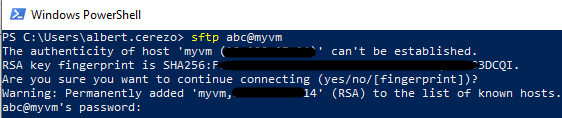
4. Enter the account password.
2. Run the command below.
-- Scripts are not supported under any SolarWinds support program or service.
-- Scripts are provided AS IS without warranty of any kind. SolarWinds further
-- disclaims all warranties including, without limitation, any implied warranties
-- of merchantability or of fitness for a particular purpose. The risk arising
-- out of the use or performance of the scripts and documentation stays with you.
-- In no event shall SolarWinds or anyone else involved in the creation,
-- production or delivery of the scripts be liable for any damages whatsoever
-- (including, without limitation, damages for loss of business profits, business
-- interruption, loss of business information, or other pecuniary loss) arising
-- out of the use of or inability to use the scripts or documentation.

sftp username@servername
3. If there is an SSH Fingerprint prompt, just type "Yes" to accept it.
4. Enter the account password.