
Security Compliance
Configure USB Defender to allow or disallow specific user groups in SEM
This article provides steps on how to configure USB Defender to allow or disallow specific user groups. By default, the Detach Unauthorized USB Device rule detaches any USB devices that are not specified in the Allowed USB Devices User Defined Group.
First published date
10/9/2018 2:39 AM
Last published date
10/9/2018 2:39 AM
Overview
This article applies to Security Event Manager (formerly Log & Event Manager).
This article provides steps on how to configure USB Defender to allow or disallow specific user groups. By default, the Detach Unauthorized USB Device rule detaches any USB devices that are not specified in the Allowed USB Devices User Defined Group.
This article provides steps on how to configure USB Defender to allow or disallow specific user groups. By default, the Detach Unauthorized USB Device rule detaches any USB devices that are not specified in the Allowed USB Devices User Defined Group.
Product section
Security Event Manager
Cause
N/A
Resolution
SEM Flash console
- Go to Build > Rules and edit your Detach Unauthorized USB Device rule.
- Add an additional condition in the Correlations section that looks like:
SystemStatus.SourceAccount = YOURDEFINEDGROUP (EQUAL sign to include)
or
SystemStatus.SourceAccount != YOURDEFINEDGROUP (NOT EQUAL sign to exclude)
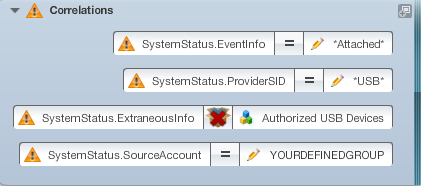
NOTE: YOURDEFINEDGROUP can be either a User Defined Group that you created or a Directory Service Group that you imported under Build > Groups. Both of these options will have their own section on the left side of the screen while editing your rule.
SEM HTML5 console
- In the SEM Events Console, click the Rules tab.
- Create rule from template, Select your Detach Unauthorized USB Device rule, and then click Edit.
- Add the condition as mentioned above.